


AI-200 Certification Exam Dumps Questions in here [Aug-2026]
Updated AI-200 Exam Practice Test Questions
NEW QUESTION # 47
You must ensure an Azure OpenAI-powered application never exceeds a defined token-per- minute budget across all users to avoid runaway costs. What should you configure?
- A. Model temperature
- B. Deployment-level rate limits (TPM/RPM) in Azure AI Foundry
- C. A vector index size limit in Azure AI Search
- D. Content filtering severity levels
Answer: B
Explanation:
Each Azure OpenAI deployment can have Tokens-Per-Minute (TPM) and Requests-Per-Minute (RPM) limits configured, which cap consumption at the deployment level and directly control cost exposure.
NEW QUESTION # 48
A development team wants to compare multiple prompt variations against the same test dataset and visualize which prompt performs best. What should they use in Azure AI Foundry?
- A. Model deployment quota management
- B. Speech Studio custom voice
- C. Prompt flow with variants
- D. Azure AI Search indexers
Answer: C
Explanation:
Prompt flow variants allow you to define multiple versions of a prompt/node, run them against the same evaluation dataset, and compare results side-by-side to identify the best-performing variant.
NEW QUESTION # 49
Case Study 1 - Fabrikam Inc.
Background
Fabrikam Inc. is a global retail analytics company that provides AI-driven demand forecasting and product recommendation services to online retailers. The company is modernizing its solution to run entirely on Microsoft Azure.
The platform ingests transaction data, generates embeddings for semantic retrieval, performs vector similarity search, and returns product recommendations through containerized microservices. Developers use Python and Azure SDKs. Operations teams manage container orchestration, scaling, monitoring, and security.
The solution must meet strict performance, scalability, and security requirements.
Current environment
Application architecture
The Recommendation engine is a customer-facing HTTP API running as a containerized Python application. The engine is deployed to Azure Container Apps (ACA).
Embeddings are stored in Azure Database for PostgreSQL by using pgvector.
Semantic retrieval uses metadata filtering combined with vector similarity search.
Azure Managed Redis is used as a caching layer.
Front-end and API workloads are deployed to Azure Container Apps (ACA).
Batch model retraining workloads run in Azure Kubernetes Service (AKS).
Container and CI/CD
Container images are stored in Azure Container Registry (ACR).
CI/CD uses ACR Tasks to build images on commit.
ACA environments support revision management.
AKS workloads are deployed by using Kubernetes manifest files stored in Git.
Monitoring
Logs are collected in Azure Monitor.
Teams inspect container logs and Kubernetes events when troubleshooting.
Developers write KQL queries to analyze latency spikes.
Business requirements
Customer experience: Maintain a seamless, low-latency recommendation experience for end- users, even during unpredictable seasonal traffic spikes.
Operational cost efficiency: Minimize compute expenditures by deallocating resources during periods of inactivity and by preventing runaway scaling costs.
Data integrity and freshness: Ensure that product recommendations always reflect the most current catalog metadata and pricing to prevent customer dissatisfaction.
Security and compliance: Adhere to a Zero Trust security model by eliminating long-lived credentials and centralizing the management of all sensitive secrets.
Global scalability: Support the rapid ingestion of millions of new product embeddings daily without degrading query performance for existing retailers.
Technical requirements
Performance: Semantic search latency must remain under 200 milliseconds at peak load.
Database optimization: Use pgvector for embeddings and implement metadata filtering to reduce compute overhead. Configure compute and memory appropriately for vector workloads to ensure high-dimensional index residency in RAM and efficient mathematical throughput. Vector similarity calculations must be performed only against products that satisfy mandatory metadata constraints.
Database performance: Database connections must support high concurrency with minimal latency through the implementation of connection optimization.
Data load strategy: To ensure maximum ingestion throughput, secondary indexes must be applied only after bulk loading of embeddings is complete.
Caching: Redis cache entries must expire automatically after 10 minutes. Implement a reactive mechanism to invalidate cache entries upon metadata updates.
Identity: Use managed identities for all service-to-service and service-to-database authentication.
Plain-text credentials in configuration files are strictly prohibited.
Secret management: All secrets must be stored centrally. Secrets must be rotated automatically by using a centralized lifecycle policy.
Scaling: Use Kubernetes event-driven autoscaling (KEDA) for event-driven scaling. The Recommendation API must scale based on HTTP traffic, while batch jobs must scale based on queue length and support scale-to-zero.
CI/CD: All images must be stored in Azure Container Registry. Use ACR Tasks to automate image builds triggered by source code commits.
Monitoring: Use KQL to analyze performance telemetry and troubleshoot microservice connectivity failures. Inspect logs and events when troubleshooting AKS and ACA.
You need to implement a secret management solution for the Recommendation API to satisfy the security and identity requirements of Fabrikam Inc.
Which service should you use?
- A. Azure App Configuration
- B. Azure Key Vault
- C. Kubernetes secrets
- D. Container environment variables
Answer: B
Explanation:
Scenario, technical requirements: Secret management: All secrets must be stored centrally.
Secrets must be rotated automatically by using a centralized lifecycle policy.
Azure Key Vault is the correct and recommended service to store secrets in this scenario. It fulfills all the requirements for centralized management, Python SDK integration, and automated rotation.
Reference:
https://www.cloudthat.com/resources/blog/securing-sensitive-information-with-azure-key-vault
NEW QUESTION # 50
Hotspot Question
You are creating an app that uses Event Grid to connect with other services. Your app's event data will be sent to a serverless function that checks compliance. This function is maintained by your company.
You write a new event subscription at the scope of your resource. The event must be invalidated after a specific period of time.
You need to configure Event Grid.
What should you do? To answer, select the appropriate options in the answer area.
NOTE: Each correct selection is worth one point.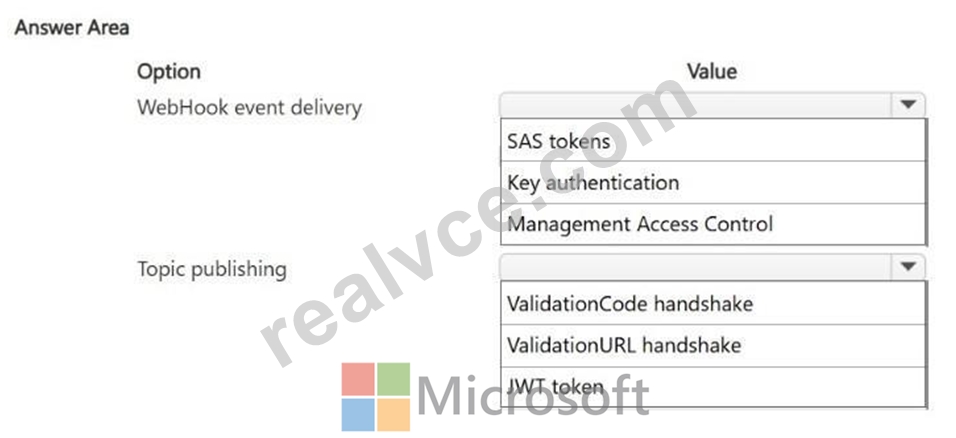
Answer:
Explanation: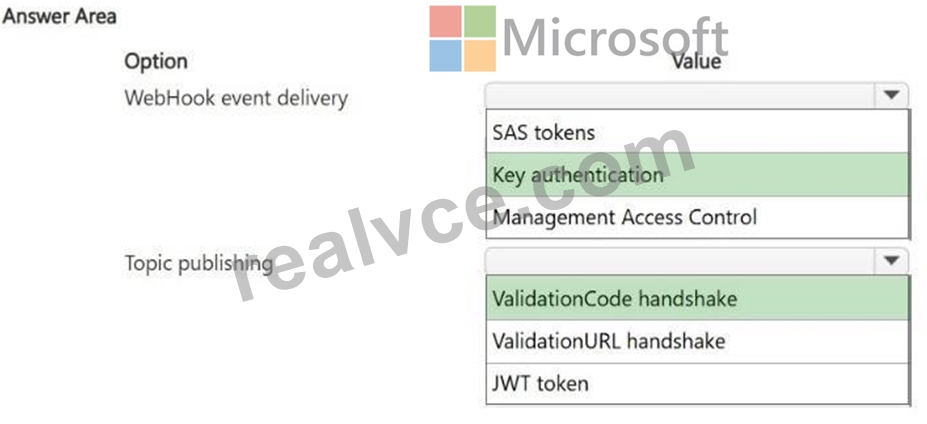
Explanation:
Box 1: Key authentication
For secure, authenticated delivery to your company's serverless function, configure the Event Grid subscription using Key authentication. Select WebHook as the endpoint type and set the destination to your serverless function's HTTPS URL.
Box 2: ValidationCode handshake
For topic publishing in this scenario, you should configure Event Grid to use the ValidationCode handshake. This mechanism ensures that the company's compliance Azure Function securely verifies ownership of the endpoint by echoing a specific validation code back to Event Grid when the new subscription is registered at the scope of the resource.
Reference:
https://learn.microsoft.com/en-us/azure/event-grid/security-authorization
NEW QUESTION # 51
Case Study 1 - Fabrikam Inc.
Background
Fabrikam Inc. is a global retail analytics company that provides AI-driven demand forecasting and product recommendation services to online retailers. The company is modernizing its solution to run entirely on Microsoft Azure.
The platform ingests transaction data, generates embeddings for semantic retrieval, performs vector similarity search, and returns product recommendations through containerized microservices. Developers use Python and Azure SDKs. Operations teams manage container orchestration, scaling, monitoring, and security.
The solution must meet strict performance, scalability, and security requirements.
Current environment
Application architecture
The Recommendation engine is a customer-facing HTTP API running as a containerized Python application. The engine is deployed to Azure Container Apps (ACA).
Embeddings are stored in Azure Database for PostgreSQL by using pgvector.
Semantic retrieval uses metadata filtering combined with vector similarity search.
Azure Managed Redis is used as a caching layer.
Front-end and API workloads are deployed to Azure Container Apps (ACA).
Batch model retraining workloads run in Azure Kubernetes Service (AKS).
Container and CI/CD
Container images are stored in Azure Container Registry (ACR).
CI/CD uses ACR Tasks to build images on commit.
ACA environments support revision management.
AKS workloads are deployed by using Kubernetes manifest files stored in Git.
Monitoring
Logs are collected in Azure Monitor.
Teams inspect container logs and Kubernetes events when troubleshooting.
Developers write KQL queries to analyze latency spikes.
Business requirements
Customer experience: Maintain a seamless, low-latency recommendation experience for end- users, even during unpredictable seasonal traffic spikes.
Operational cost efficiency: Minimize compute expenditures by deallocating resources during periods of inactivity and by preventing runaway scaling costs.
Data integrity and freshness: Ensure that product recommendations always reflect the most current catalog metadata and pricing to prevent customer dissatisfaction.
Security and compliance: Adhere to a Zero Trust security model by eliminating long-lived credentials and centralizing the management of all sensitive secrets.
Global scalability: Support the rapid ingestion of millions of new product embeddings daily without degrading query performance for existing retailers.
Technical requirements
Performance: Semantic search latency must remain under 200 milliseconds at peak load.
Database optimization: Use pgvector for embeddings and implement metadata filtering to reduce compute overhead. Configure compute and memory appropriately for vector workloads to ensure high-dimensional index residency in RAM and efficient mathematical throughput. Vector similarity calculations must be performed only against products that satisfy mandatory metadata constraints.
Database performance: Database connections must support high concurrency with minimal latency through the implementation of connection optimization.
Data load strategy: To ensure maximum ingestion throughput, secondary indexes must be applied only after bulk loading of embeddings is complete.
Caching: Redis cache entries must expire automatically after 10 minutes. Implement a reactive mechanism to invalidate cache entries upon metadata updates.
Identity: Use managed identities for all service-to-service and service-to-database authentication.
Plain-text credentials in configuration files are strictly prohibited.
Secret management: All secrets must be stored centrally. Secrets must be rotated automatically by using a centralized lifecycle policy.
Scaling: Use Kubernetes event-driven autoscaling (KEDA) for event-driven scaling. The Recommendation API must scale based on HTTP traffic, while batch jobs must scale based on queue length and support scale-to-zero.
CI/CD: All images must be stored in Azure Container Registry. Use ACR Tasks to automate image builds triggered by source code commits.
Monitoring: Use KQL to analyze performance telemetry and troubleshoot microservice connectivity failures. Inspect logs and events when troubleshooting AKS and ACA.
You need to improve throughput for concurrent application requests to PostgreSQL. What should you implement?
- A. Increase max_connections.
- B. Implement connection pooling.
- C. Enable read replicas.
- D. Increase shared_buffers.
Answer: B
Explanation:
To improve throughput for highly concurrent application requests in this architecture, you should implement connection pooling.
PostgreSQL follows a process-based architecture where each client connection spawns a separate backend process. This consumes significant memory and CPU overhead during high concurrency. Connection pooling (using tools like PgBouncer or Azure's built-in pooler) allows containerized microservices to reuse a fixed set of database connections. This drastically reduces connection overhead, prevents database exhaustion, and maximizes throughput for short, rapid API queries like vector similarity searches.
Reference:
https://medium.com/@srajanpathak45/a-principal-engineers-guide-to-postgresql-and-modern-alternatives-e8920fd6269a
NEW QUESTION # 52
Case Study 2 - Proseware Inc.
Background
Proseware Inc. develops AI-powered knowledge management solutions for enterprise customers.
The company is modernizing its platform to support semantic search, intelligent document retrieval, and real-time partner integrations.
The engineering team uses Python and Azure SDKs. The architecture is being redesigned to support containerized microservices, vector search workloads, and serverless backend processing.
Planned Application Architecture
Microservices are containerized by using Docker.
Code for containerized microservices and Azure Function apps is developed locally but stored in a GitHub repository.
Custom images for containerized microservices are stored in Azure Container Registry (ACR).
Base images are stored in Docker Hub. Custom images must be rebuilt automatically whenever their base images are updated.
Azure Cosmos DB for NoSQL stores documents, metadata, and vector embeddings.
Azure Functions generate vector embeddings of Azure Cosmos DB for NoSQL-hosted documents and send messages to Service Bus to trigger search index updates.
Azure Container Apps (ACA) apps host backend API services that provide semantic search across Azure Cosmos DB for NoSQL documents. API services process Service Bus messages and update search indexes.
Azure Kubernetes Service (AKS) processes batch vector embedding regeneration for existing Azure Cosmos DB for NoSQL documents (whenever the embedding model is changed).
An extranet-facing containerized webhook allows business partners to submit documents to be processed by internal AI workflows for semantic search and retrieval.
Monitoring
Telemetry generated by Azure resources is sent to Azure Monitor.
A Log Analytics workspace is used to collect ACA apps logs, AKS container logs, and Azure Functions apps logs.
Monitoring of Azure Functions is currently implemented by using Azure Application Insights SDK instrumentation.
Business Requirements
Embeddings for new or updated Azure Cosmos DB for NoSQL-hosted documents must be automatically generated.
Backend API services must scale automatically during business hours.
Cold start delay of backend APIs must be minimized.
Secrets must be stored outside of container images.
Developers must be able to correlate telemetry across Azure Functions hosts and apps.
All tracing must be implemented by using OpenTelemetry SDK instrumentation.
Development efforts must be minimized.
Technical Requirements
Container images must be built automatically and validated before code updates are merged into the main branch.
Image build automation must run inside the Azure Container Registry, eliminating dependency on local developer machines and external build services.
Dependency of image builds on local developer machines must be eliminated.
Event-driven scaling in ACA must occur based on the number of pending messages in the Azure Service Bus queue.
Azure Cosmos DB for NoSQL RU consumption must be minimized.
Vector similarity search must use embeddings stored in Azure Cosmos DB for NoSQL.
The partner-facing containerized webhook service must run on Azure App Service.
Secrets must NOT be stored in container images, source control, or application configuration directly. They must be accessed securely at runtime.
All secrets must be stored centrally in Azure Key Vault and accessed at runtime through a managed identity.
Azure App Service must supply secrets at runtime without relying on external services.
Resources and workloads must be deployed by using Bicep templates through an automated, version-controlled pipeline. Local and command-line deployments must be eliminated to ensure repeatable, auditable deployments.
Known Issues
RU consumption spikes during vector similarity queries.
Hotspot Question
You need to configure image build automation based on the technical requirements.
Which settings should you configure? To answer, select the appropriate options in the answer area.
NOTE: Each correct selection is worth one point.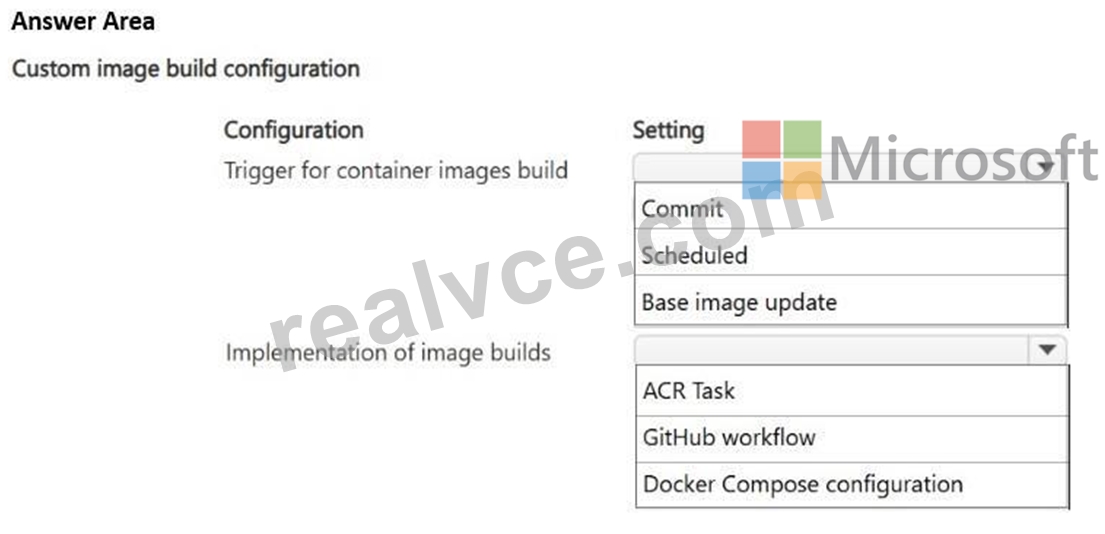
Answer:
Explanation: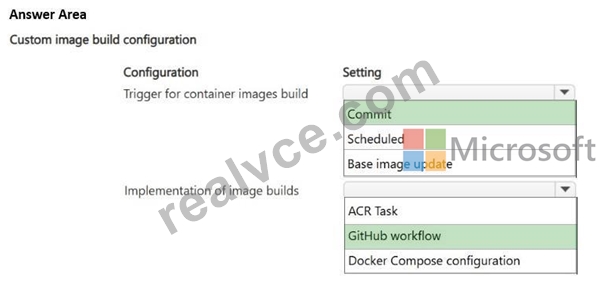
Explanation:
Scenario, Technical Requirements
Container images must be built automatically and validated before code updates are merged into the main branch.
Image build automation must run inside the Azure Container Registry, eliminating dependency on local developer machines and external build services.
Dependency of image builds on local developer machines must be eliminated.
Box 1: Commit
Use a Commit trigger for this configuration
Immediate Validation: Builds continuous integration (CI) pipelines automatically when a developer submits a pull request or pushes code.
Gatekeeper Function: Prevents unvalidated code or broken container images from merging into your main branch.
Workflow Alignment: Supports microservices development by isolating tests to the specific code updates being introduced.
Box 2: GitHub workflow
To implement automatic image builds and validation before code updates are merged into the main branch, you should use a GitHub workflow.
Branch gating: GitHub Actions can trigger specifically on pull_request events targeting the main branch, allowing you to validate code and builds before merging.
Automation control: It orchestrates the entire continuous integration (CI) pipeline, including linting, running unit tests, building Docker images, and scanning them for vulnerabilities.
Integration capacity: It can seamlessly hand off the successfully validated image to Azure Container Registry (ACR) or utilize ACR Tasks under the hood as part of the pipeline steps.
Reference:
https://docs.github.com/en/actions/tutorials/publish-packages/publish-docker-images
NEW QUESTION # 53
Drag and Drop Question
You are developing a new page for a website that uses Azure Cosmos DB for data storage. The feature uses documents that have the following format:
You must display data for the new page in a specific order. You create the following query for the page:
You need to configure an Azure Cosmos DB policy to support the query.
How should you configure the policy? To answer, drag the appropriate JSON segments to the correct locations. Each JSON segment may be used once, more than once, or not at all. You may need to drag the split bar between panes or scroll to view content.
NOTE: Each correct selection is worth one point.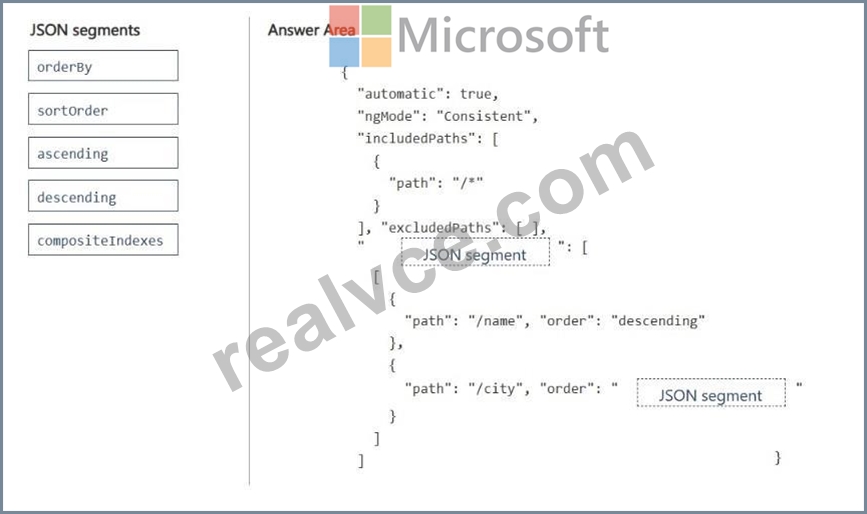
Answer:
Explanation: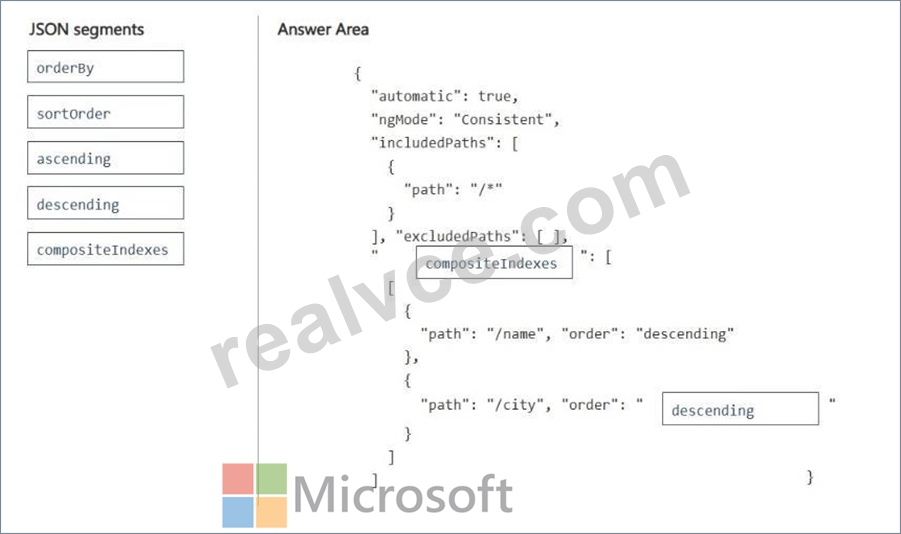
Explanation:
Box 1: compositeIndexes
Azure Cosmos DB requires a defined composite index for any query utilizing an ORDER BY clause with multiple properties.
Box 2: descending
In an ORDER BY clause, properties without an explicit direction default to ascending order. Your query ORDER BY p.name, p.city DESC translates to an ascending sort on /name and a descending sort on /city.
Reference:
https://docs.azure.cn/en-us/cosmos-db/index-policy
NEW QUESTION # 54
Drag and Drop Question
A Python API retrieves a document from Azure Database for PostgreSQL by using a SQL statement. The API accepts the document ID from user input. The current implementation inserts the document ID directly into the SQL statement.
You need to secure the SQL statement execution by minimizing the possibility of SQL injection.
How should you modify the current implementation? To answer, move the appropriate configurations to the correct requirements. You may use each configuration once, more than once, or not at all. You may need to move the split bar between panes or scroll to view content.
NOTE: Each correct selection is worth one point.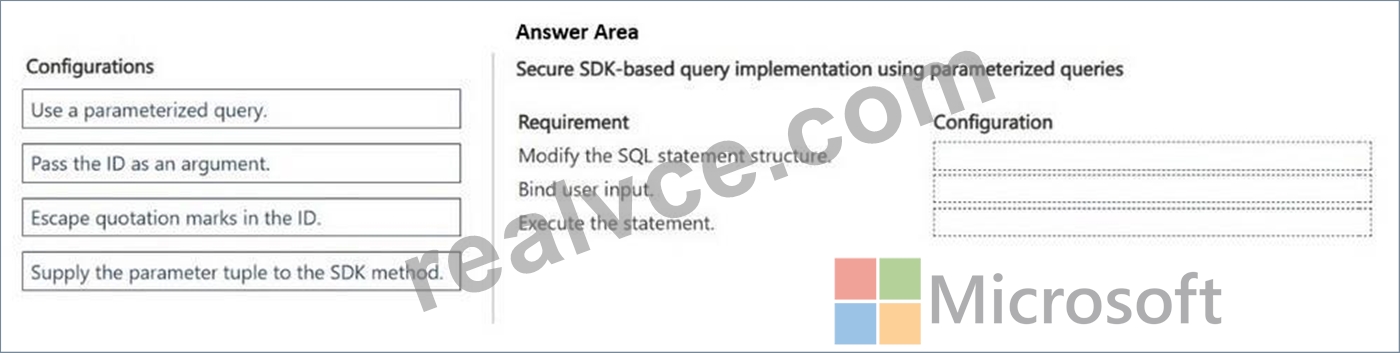
Answer:
Explanation: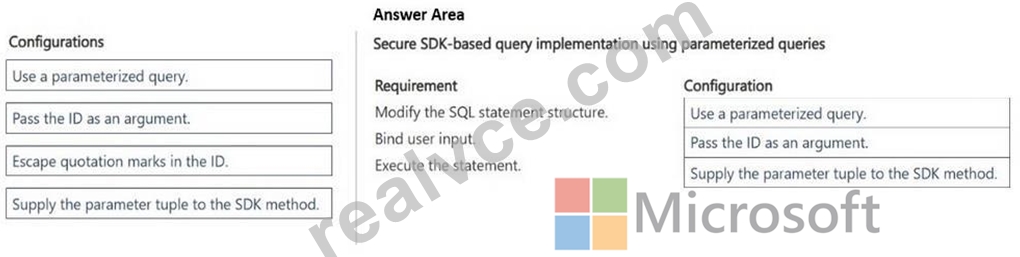
Explanation:
Box 1: Use a parameterized query
To secure your SQL statement against SQL injection, you must replace direct string insertion with parameterized queries (also known as prepared statements).
Box 2: Pass the ID as an argument
The current implementation inserts the document ID directly into the SQL statement.
Box 3: Supply the parameter tuple to the SDK method
Supply parameter tuples: Pass the user input as a separate tuple or list argument into your database driver's execution method (e.g., cursor.execute(query, (document_id,))).
Reference:
https://www.stackhawk.com/blog/finding-and-fixing-sql-injection-vulnerabilities-in-flask-python/
NEW QUESTION # 55
You deploy a production Azure Function app that connects to an Azure SQL Database.
The solution must provide the following functionality:
- Prevent secrets from being exposed in source control.
- Support secret rotation without redeploying the function app.
- Avoid downtime during credential updates.
You need to configure secure and maintainable secret management.
What should you configure?
- A. Parameter file stored in source control
- B. Hard-coded connection string in the startup class
- C. Environment variables in local.settings.json
- D. Application settings with Key Vault references
Answer: D
Explanation:
To meet all requirements, you should configure Application settings with Key Vault references.
Source Control Protection: The Function App source code and configuration files only store a reference URI (e.g., @Microsoft.KeyVault(SecretUri=...)) rather than the actual connection string, keeping secrets entirely out of source control.
Seamless Secret Rotation: Azure Key Vault handles secret rotation natively. When a database password changes, you simply update the secret in Key Vault.
Zero Downtime: By using versionless Key Vault references (omitting the specific version GUID from the URI), the Azure Function App will automatically fetch the latest secret version within 24 hours without requiring a code redeployment or app restart.
References:
https://oneuptime.com/blog/post/2026-02-16-how-to-configure-managed-identity-for-azure-app-service-to-access-key-vault-secrets-without-credentials/view
NEW QUESTION # 56
Drag and Drop Question
You are developing a serverless Java application on Azure. You create a new Azure Key Vault to work with secrets from a new Azure Functions application.
The application must meet the following requirements:
- Reference the Azure Key Vault without requiring any changes to the
Java code.
- Dynamically add and remove instances of the Azure Functions host
based on the number of incoming application events.
- Ensure that instances are perpetually warm to avoid any cold starts.
- Connect to a VNet.
- Authentication to the Azure Key Vault instance must be removed if the Azure Functions application is deleted.
You need to grant the Azure Functions application access to the Azure Key Vault.
Which three actions should you perform in sequence? To answer, move the appropriate actions from the list of actions to the answer area and arrange them in the correct order.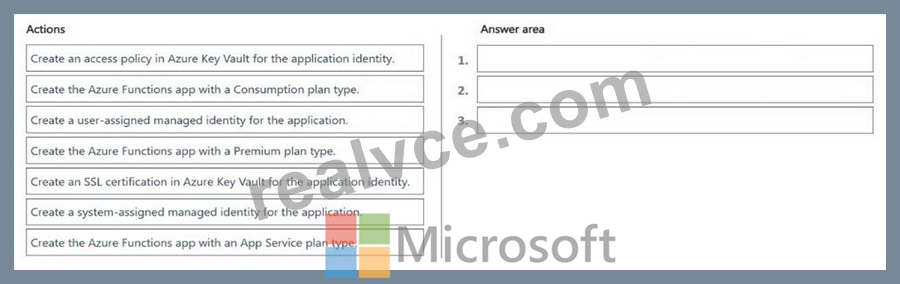
Answer:
Explanation: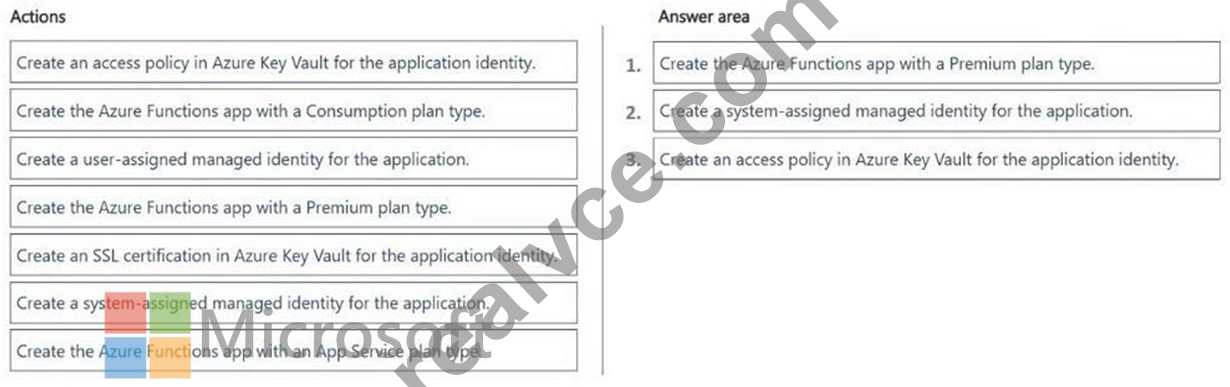
Explanation:
Step 1: Create the Azure Functions app with a Premium plan type
Perpetually Warm & VNet: The Premium plan type is the only serverless-scale hosting option that satisfies requirement 3 (keeping instances warm to eliminate cold starts) and requirement 4 (native regional VNet integration). The Consumption plan type does not keep instances warm and does not support VNet injection.
Event-Driven Scaling: It fulfills requirement 2 by dynamically adding and removing host instances using the event-driven scale controller.
Step 2: Create a system-assigned managed identity for the application
Lifecycle Coupling: It directly satisfies requirement 5. A system-assigned managed identity is tied strictly to the lifecycle of the Azure Functions resource. If the Functions application is deleted, Azure automatically removes the identity and its authentication token, ensuring that access to the Key Vault is immediately revoked. A user-assigned identity exists as an independent resource and would persist after the application's deletion.
Step 3: Create an access policy in Azure Key Vault for the application identity Granting Permissions: This step completes the access requirements. By adding an access policy (or an Azure RBAC role assignment) in Azure Key Vault specifically for the created system- assigned managed identity, you grant the runtime environment the necessary permissions to retrieve secrets.
No Code Changes: Combining the managed identity with an App Setting configured as an Azure Key Vault Reference allows the Functions platform to fetch secrets automatically at runtime, keeping your Java source code unchanged Reference:
https://learn.microsoft.com/en-us/azure/azure-functions/functions-best-practices
NEW QUESTION # 57
You deploy multiple instances of a change feed processor to handle a high ingestion rate within Azure Cosmos DB for NoSQL.
Each processor instance must process a different subset of partitions.
You need to ensure the workload is load-balanced across all processor instances.
What should you configure?
- A. lease container
- B. indexing precision
- C. strong consistency
- D. autoscale throughput
Answer: A
Explanation:
To handle a high ingestion rate in Azure Cosmos DB for NoSQL, you must deploy multiple instances of the change feed processor using the same workflow name and same lease container.
Reference:
https://github.com/Azure/azure-cosmos-dotnet-v3/wiki/Comprehensive-Test-Suite-for-Azure-Cosmos-DB-Change-Feed-Processor:-All-Versions-and-Deletes
NEW QUESTION # 58
Hotspot Question
You are developing an event-driven system that reacts to new or updated documents in Azure Cosmos DB for NoSQL.
The application must process new or updated documents as they appear in the container by using a change feed processor. The application must also maintain processor state between runs.
You need to configure the components required for stateful change feed processing.
Which components should you configure? To answer, select the appropriate options in the answer area.
NOTE: Each correct selection is worth one point.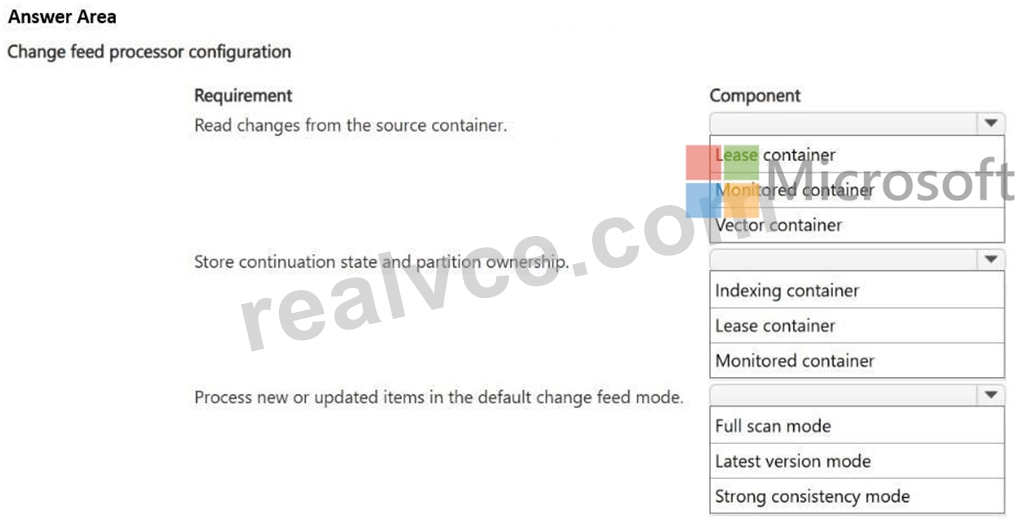
Answer:
Explanation: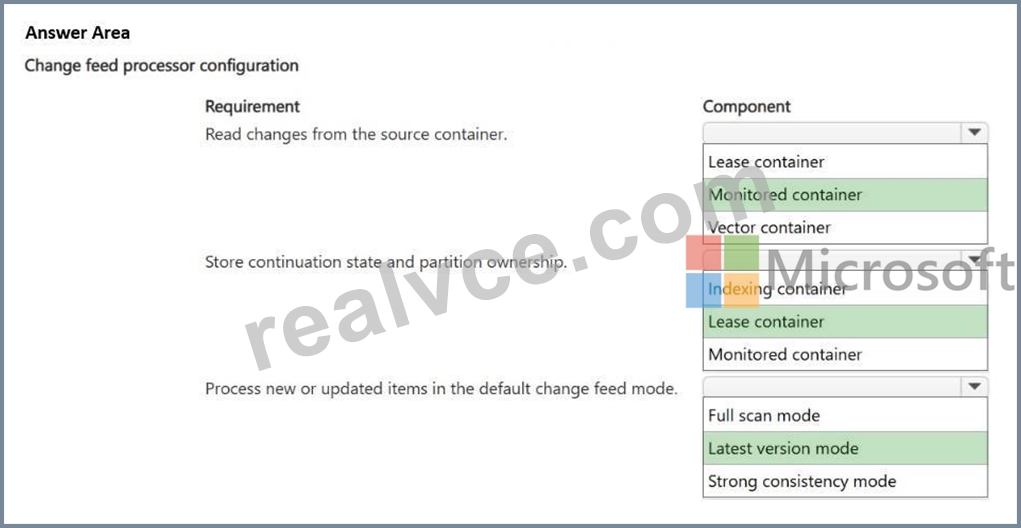
Explanation:
Box 1: Monitored container.
To read new or updated documents from the source, you need to configure the monitored container. The change feed processor listens to this container for any changes and sequentially retrieves the sorted list of modified documents.
Box 2: Lease Container
Lease Container is a separate container that acts as state storage. It maintains processing checkpoints across multiple worker instances, which allows your system to resume operations from where it left off.
Box 3: Latest version mode
To process new or updated documents, you need to use the Latest version mode of the change feed.
Latest version mode is the default change feed mode. It provides only the most recent version of each changed item (inserts and updates) in the exact order they were modified. If an item is updated multiple times in quick succession, the processor will only receive the final state after the latest update.
Reference:
https://learn.microsoft.com/en-us/azure/cosmos-db/change-feed-processor
NEW QUESTION # 59
Case Study 2 - Proseware Inc.
Background
Proseware Inc. develops AI-powered knowledge management solutions for enterprise customers.
The company is modernizing its platform to support semantic search, intelligent document retrieval, and real-time partner integrations.
The engineering team uses Python and Azure SDKs. The architecture is being redesigned to support containerized microservices, vector search workloads, and serverless backend processing.
Planned Application Architecture
Microservices are containerized by using Docker.
Code for containerized microservices and Azure Function apps is developed locally but stored in a GitHub repository.
Custom images for containerized microservices are stored in Azure Container Registry (ACR).
Base images are stored in Docker Hub. Custom images must be rebuilt automatically whenever their base images are updated.
Azure Cosmos DB for NoSQL stores documents, metadata, and vector embeddings.
Azure Functions generate vector embeddings of Azure Cosmos DB for NoSQL-hosted documents and send messages to Service Bus to trigger search index updates.
Azure Container Apps (ACA) apps host backend API services that provide semantic search across Azure Cosmos DB for NoSQL documents. API services process Service Bus messages and update search indexes.
Azure Kubernetes Service (AKS) processes batch vector embedding regeneration for existing Azure Cosmos DB for NoSQL documents (whenever the embedding model is changed).
An extranet-facing containerized webhook allows business partners to submit documents to be processed by internal AI workflows for semantic search and retrieval.
Monitoring
Telemetry generated by Azure resources is sent to Azure Monitor.
A Log Analytics workspace is used to collect ACA apps logs, AKS container logs, and Azure Functions apps logs.
Monitoring of Azure Functions is currently implemented by using Azure Application Insights SDK instrumentation.
Business Requirements
Embeddings for new or updated Azure Cosmos DB for NoSQL-hosted documents must be automatically generated.
Backend API services must scale automatically during business hours.
Cold start delay of backend APIs must be minimized.
Secrets must be stored outside of container images.
Developers must be able to correlate telemetry across Azure Functions hosts and apps.
All tracing must be implemented by using OpenTelemetry SDK instrumentation.
Development efforts must be minimized.
Technical Requirements
Container images must be built automatically and validated before code updates are merged into the main branch.
Image build automation must run inside the Azure Container Registry, eliminating dependency on local developer machines and external build services.
Dependency of image builds on local developer machines must be eliminated.
Event-driven scaling in ACA must occur based on the number of pending messages in the Azure Service Bus queue.
Azure Cosmos DB for NoSQL RU consumption must be minimized.
Vector similarity search must use embeddings stored in Azure Cosmos DB for NoSQL.
The partner-facing containerized webhook service must run on Azure App Service.
Secrets must NOT be stored in container images, source control, or application configuration directly. They must be accessed securely at runtime.
All secrets must be stored centrally in Azure Key Vault and accessed at runtime through a managed identity.
Azure App Service must supply secrets at runtime without relying on external services.
Resources and workloads must be deployed by using Bicep templates through an automated, version-controlled pipeline. Local and command-line deployments must be eliminated to ensure repeatable, auditable deployments.
Known Issues
RU consumption spikes during vector similarity queries.
You need to configure Azure Functions to generate vector embeddings according to planned environment application architecture.
Which trigger type should you use?
- A. Service Bus
- B. Azure Cosmos DB
- C. Event Grid
- D. HTTP
Answer: B
Explanation:
The most appropriate trigger type for this architecture is the Azure Cosmos DB Trigger.
This trigger monitors your NoSQL container's underlying change feed. When a document is created or modified, the function fires automatically, processes the data, generates the embedding, and places a message in Azure Service Bus.
Scenario, Planned Application Architecture
Azure Functions generate vector embeddings of Azure Cosmos DB for NoSQL-hosted documents and send messages to Service Bus to trigger search index updates.
Reference:
https://learn.microsoft.com/en-us/azure/cosmos-db/integrated-embeddings
NEW QUESTION # 60
You are designing an Azure Function that will process orders from a new Azure Service Bus queue.
You need to prevent the system from processing messages more than once and preserve failed messages for investigation.
Which two actions should you implement? Each correct answer presents part of the solution.
NOTE: Each correct selection is worth one point.
- A. Enable duplicate detection on the queue.
- B. Include a dead-letter handling process.
- C. Process orders by using an HTTP trigger.
- D. Enable sessions on Service Bus.
Answer: A,B
Explanation:
To ensure reliable order processing with zero duplicates and safe error handling, you should implement an Azure Function with an Azure Service Bus Trigger utilizing duplicate detection, PeekLock settlement, and custom dead-letter routing.
References:
https://azureintegrations.com/2020/03/01/azure-servce-bus-best-practises/
NEW QUESTION # 61
You maintain multiple versions of a container image in Azure Container Registry.
The production deployment must always run the exact same image build even if tags are changed later.
You need to ensure predictable and immutable image selection during deployment.
What should you do?
- A. Schedule nightly rebuilds of the image.
- B. Tag the image as production and deploy it by using the production tag.
- C. Configure deployment to use the latest tag.
- D. Identify the image by using its SHA digest.
Answer: D
Explanation:
Deploying a container image by its unique SHA-256 digest digest instead of its tag ensures a predictable and immutable deployment. Tags can be overwritten or moved to different image builds, but a digest is a cryptographic hash that never changes.
Reference:
https://container-registry.com/posts/container-image-versioning/
NEW QUESTION # 62
You are building a RAG (retrieval-augmented generation) solution using Azure AI Foundry. The knowledge base consists of 50,000 PDF documents stored in Azure Blob Storage. You need to make the document content searchable by the language model with minimal custom code. What should you use?
- A. Azure Cognitive Service for Language custom text classification
- B. Azure AI Search integrated vectorization with a skillset
- C. Azure Functions to manually chunk and embed each document
- D. Azure Table Storage with full-text indexing
Answer: B
Explanation:
Azure AI Search's integrated vectorization feature lets you point a skillset directly at a blob data source, and it handles chunking, embedding generation (via an Azure OpenAI embedding model), and indexing automatically -- minimizing custom code compared to manually building a chunking/embedding pipeline.
NEW QUESTION # 63
You develop a message-processing service deployed to Azure Container Apps. The service reads messages from an Azure Service Bus queue.
The solution must minimize costs by ensuring NO compute resources are consumed when the queue is empty.
You need to configure scaling for the service.
Which two actions should you perform? Each correct answer presents part of the solution.
NOTE: Each correct selection is worth one point.
- A. Configure the scaling rule to allow for the termination of all active replicas.
- B. Increase the scaling rule to allow for the maximum running replica count.
- C. Configure a Kubernetes Event-driven Autoscaler rule that monitors queue length.
- D. Enable HTTP ingress concurrency scaling.
Answer: A,C
Explanation:
[C]
You can configure an Azure Service Bus scale rule in Azure Container Apps, which utilizes built- in KEDA (Kubernetes Event-driven Autoscaling) to monitor queue length and scale the app from zero instances to meet your processing demands.
[B]
Configure the scaling rule to allow for the termination of all active replicas is the correct action to take.
To ensure that no compute resources are consumed when the queue is empty, you must set the minimum replica count (minReplicas) to 0 in your Azure Container Apps scaling configuration.
When the Azure Service Bus queue has zero messages, KEDA will scale the container replicas down to zero, stopping all compute billing.
Reference:
https://learn.microsoft.com/en-us/azure/container-apps/scale-app
NEW QUESTION # 64
Hotspot Question
A Python web API uses OpenTelemetry for tracing. The call_downstream_service function makes an outbound HTTP request by using the requests library.
The following code is the only OpenTelemetry configuration in the application: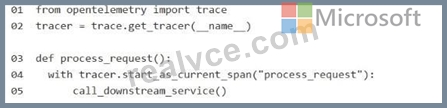
For each of the following statements, select Yes if the statement is true. Otherwise, select No.
NOTE: Each correct selection is worth one point.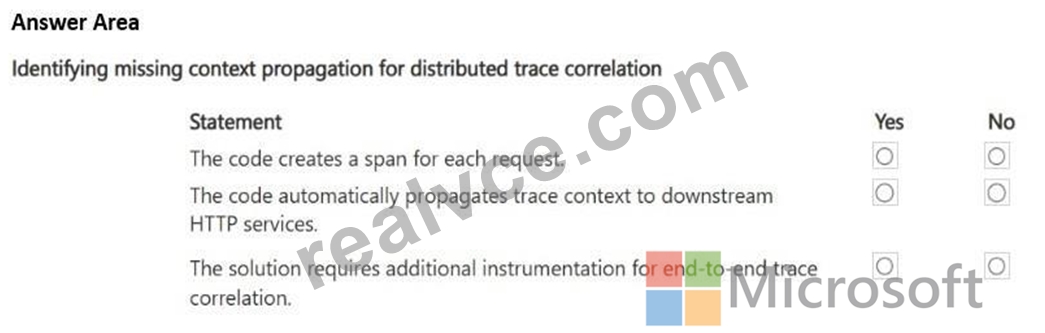
Answer:
Explanation: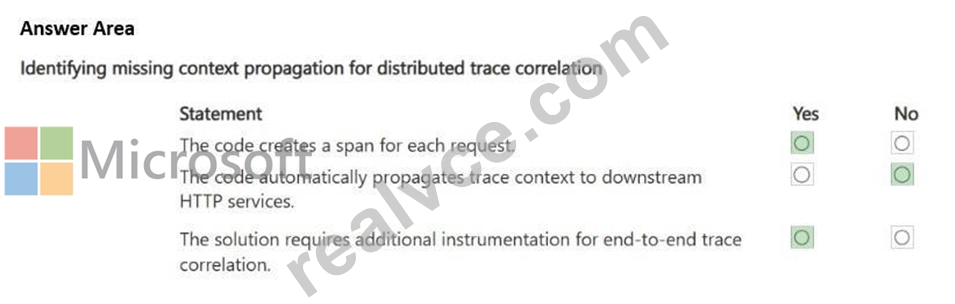
Explanation:
Box 1: Yes
This code will successfully create a local span for the process_request function, but it will not automatically create or propagate spans for the outbound HTTP request made by the requests library.
Box 2: No
Manual tracing only: Your current configuration only creates a span for the code wrapped inside the with tracer.start_as_current_span(...) context manager.
Box 3: Yes
Missing instrumentation: The standard requests library does not natively know about OpenTelemetry. It requires an external instrumentation package to hook into its network calls.
Reference:
https://learn.microsoft.com/en-us/python/api/overview/azure/core-tracing-opentelemetry-readme
NEW QUESTION # 65
Drag and Drop Question
You are deploying an Azure Function app that retrieves secrets from Key Vault by using a managed identity.
The deployment must ensure that identity and secret configuration are in place before the function code is deployed.
You need to deploy the function app securely.
In which order should you perform the actions? To answer, move all actions from the list of actions to the answer area and arrange them in the correct order.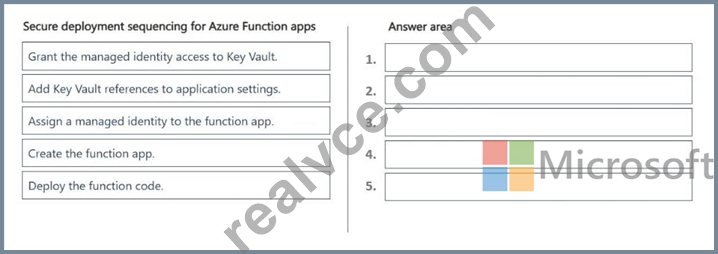
Answer:
Explanation: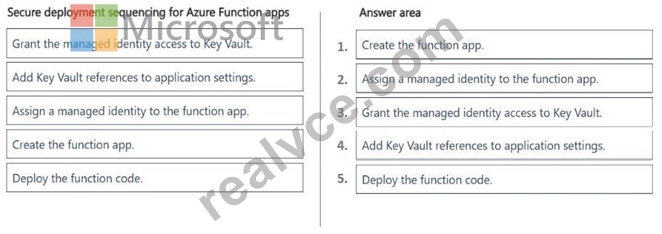
Explanation:
Step 1: Create the function app
You must first provision the underlying Azure Functions infrastructure before you can bind an identity or configuration settings to it.
Step 2: Assign a managed identity to the function app
Turning on the managed identity (such as a system-assigned identity) creates a distinct security principal in Microsoft Entra ID for the resource.
Step 3: Grant access to Key Vault
Use the managed identity's principal ID to create an access policy or RBAC role assignment in Key Vault, allowing the app to read secrets.
Step 4: Add Key Vault references to application settings.
Configure the Function App's application settings to point to the Key Vault secret URIs (@Microsoft.KeyVault(...)), which can now be securely resolved by the identity.
Step 5: Deploy the function code
Finally, deploy the application code. This ensures that when the code initializes and executes, all environment variables and secrets are already active and accessible, preventing application startup failures.
Reference:
https://learn.microsoft.com/en-us/azure/app-service/app-service-key-vault-references
NEW QUESTION # 66
Case Study 1 - Fabrikam Inc.
Background
Fabrikam Inc. is a global retail analytics company that provides AI-driven demand forecasting and product recommendation services to online retailers. The company is modernizing its solution to run entirely on Microsoft Azure.
The platform ingests transaction data, generates embeddings for semantic retrieval, performs vector similarity search, and returns product recommendations through containerized microservices. Developers use Python and Azure SDKs. Operations teams manage container orchestration, scaling, monitoring, and security.
The solution must meet strict performance, scalability, and security requirements.
Current environment
Application architecture
The Recommendation engine is a customer-facing HTTP API running as a containerized Python application. The engine is deployed to Azure Container Apps (ACA).
Embeddings are stored in Azure Database for PostgreSQL by using pgvector.
Semantic retrieval uses metadata filtering combined with vector similarity search.
Azure Managed Redis is used as a caching layer.
Front-end and API workloads are deployed to Azure Container Apps (ACA).
Batch model retraining workloads run in Azure Kubernetes Service (AKS).
Container and CI/CD
Container images are stored in Azure Container Registry (ACR).
CI/CD uses ACR Tasks to build images on commit.
ACA environments support revision management.
AKS workloads are deployed by using Kubernetes manifest files stored in Git.
Monitoring
Logs are collected in Azure Monitor.
Teams inspect container logs and Kubernetes events when troubleshooting.
Developers write KQL queries to analyze latency spikes.
Business requirements
Customer experience: Maintain a seamless, low-latency recommendation experience for end- users, even during unpredictable seasonal traffic spikes.
Operational cost efficiency: Minimize compute expenditures by deallocating resources during periods of inactivity and by preventing runaway scaling costs.
Data integrity and freshness: Ensure that product recommendations always reflect the most current catalog metadata and pricing to prevent customer dissatisfaction.
Security and compliance: Adhere to a Zero Trust security model by eliminating long-lived credentials and centralizing the management of all sensitive secrets.
Global scalability: Support the rapid ingestion of millions of new product embeddings daily without degrading query performance for existing retailers.
Technical requirements
Performance: Semantic search latency must remain under 200 milliseconds at peak load.
Database optimization: Use pgvector for embeddings and implement metadata filtering to reduce compute overhead. Configure compute and memory appropriately for vector workloads to ensure high-dimensional index residency in RAM and efficient mathematical throughput. Vector similarity calculations must be performed only against products that satisfy mandatory metadata constraints.
Database performance: Database connections must support high concurrency with minimal latency through the implementation of connection optimization.
Data load strategy: To ensure maximum ingestion throughput, secondary indexes must be applied only after bulk loading of embeddings is complete.
Caching: Redis cache entries must expire automatically after 10 minutes. Implement a reactive mechanism to invalidate cache entries upon metadata updates.
Identity: Use managed identities for all service-to-service and service-to-database authentication.
Plain-text credentials in configuration files are strictly prohibited.
Secret management: All secrets must be stored centrally. Secrets must be rotated automatically by using a centralized lifecycle policy.
Scaling: Use Kubernetes event-driven autoscaling (KEDA) for event-driven scaling. The Recommendation API must scale based on HTTP traffic, while batch jobs must scale based on queue length and support scale-to-zero.
CI/CD: All images must be stored in Azure Container Registry. Use ACR Tasks to automate image builds triggered by source code commits.
Monitoring: Use KQL to analyze performance telemetry and troubleshoot microservice connectivity failures. Inspect logs and events when troubleshooting AKS and ACA.
Drag and Drop Question
You need to troubleshoot connectivity failures between microservices running in AKS.
Which troubleshooting actions should you perform? To answer, move the appropriate action to the correct troubleshooting scenario. You may use each action once, more than once, or not at all. You may need to move the split bar between panes or scroll to view content.
NOTE: Each correct selection is worth one point.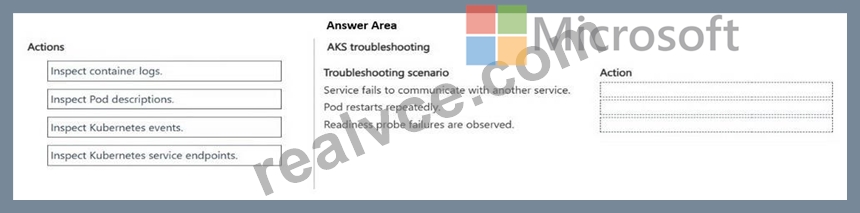
Answer:
Explanation: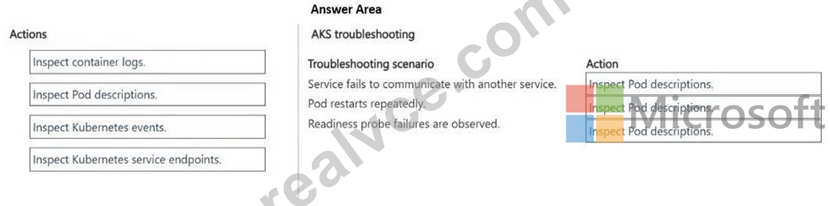
Explanation:
Box 1: Inspect Pod descriptions
Inspecting Pod descriptions is an excellent and standard first troubleshooting step to fix inter- service communication failures in Azure Kubernetes Service (AKS).
To remedy a communication failure between containerized microservices in Azure Kubernetes Service (AKS), the first and most direct troubleshooting action is to verify and debug core Kubernetes networking and DNS resolution within the cluster.
1. Check Pod Status: Ensure both the source and target pods are actively running.
Run kubectl get pods -n <namespace> to check for crash loops.
2. Verify DNS Resolution
Etc.
Box 2: Inspect Pod descriptions
To troubleshoot sudden or frequent Pod restarts in Azure Kubernetes Service (AKS), you should inspect Pod descriptions first, as they contain the Last State, Exit Code, and Reason (such as OOMKilled) for the restarted container.
Pod descriptions (Correct Choice): This is the best starting point. Running kubectl describe pod
<pod-name> provides a comprehensive status overview. It specifically reveals the Last State of the container, the Exit Code, and the Termination Reason (e.g., OOMKilled if it exceeded memory limits, or Error). It also displays the Pod's recent lifecycle events at the bottom.
Incorrect:
Container logs: While highly valuable, logs are only useful if the application managed to write an error message to stdout or stderr before crashing. If a Pod is killed externally by the system (such as an Out-Of-Memory event), the container logs will suddenly stop without showing the root cause.
Box 3: Inspect Pod descriptions
To address readiness probe failures, the most immediate and effective troubleshooting action is to inspect the Pod descriptions.
Pod descriptions: This is the correct starting point. Running kubectl describe pod <pod-name> provides a dedicated Events section at the bottom of the output. This section explicitly details exactly why a readiness probe failed, including the specific error codes, timeouts, or connection refusals, and lists the exact timestamps of the failures.
Reference:
https://blog.devgenius.io/k8s-troubleshooting-pod-in-containercreating-status-e89e093d996e?gi=e4e93cbfd5d6
https://learn.microsoft.com/en-us/troubleshoot/azure/azure-kubernetes/availability-performance/troubleshoot-oomkilled-aks-clusters
NEW QUESTION # 67
You need to add a custom voice that matches your company's brand for a text-to-speech feature, distinct from any standard neural voice. What should you use?
- A. Azure AI Translator
- B. Azure AI Speech Custom Neural Voice
- C. Azure AI Speech prebuilt neural voices
- D. Azure AI Language sentiment analysis
Answer: B
Explanation:
Custom Neural Voice lets you train a unique synthetic voice from recorded voice samples, producing a brand-specific voice rather than using one of the standard prebuilt neural voices.
NEW QUESTION # 68
You deploy a GPT-4o model in Azure AI Foundry. Users report inconsistent completions for the same prompt. You need to make outputs more deterministic without changing the prompt. What should you do?
- A. Increase the max_tokens parameter
- B. Increase the top_p parameter
- C. Set temperature to a low value such as 0
- D. Enable content filtering
Answer: C
Explanation:
Temperature controls randomness in token selection. Setting it near 0 makes the model consistently choose the highest-probability next token, producing more deterministic and repeatable output for identical prompts.
NEW QUESTION # 69
Hotspot Question
You plan to develop an Azure Functions app with an HTTP trigger.
The app must support the following functionality:
- Event-driven scaling
- Ability to use custom Linux images for function execution
You need to identify the app's hosting plan and the maximum amount of time that the app function can take to respond to incoming requests.
Which configuration setting values should you use? To answer, select the appropriate values in the answer area.
NOTE: Each correct selection is worth one point.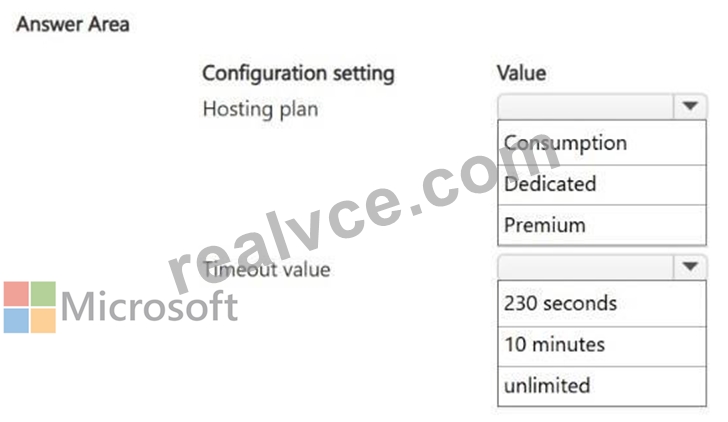
Answer:
Explanation: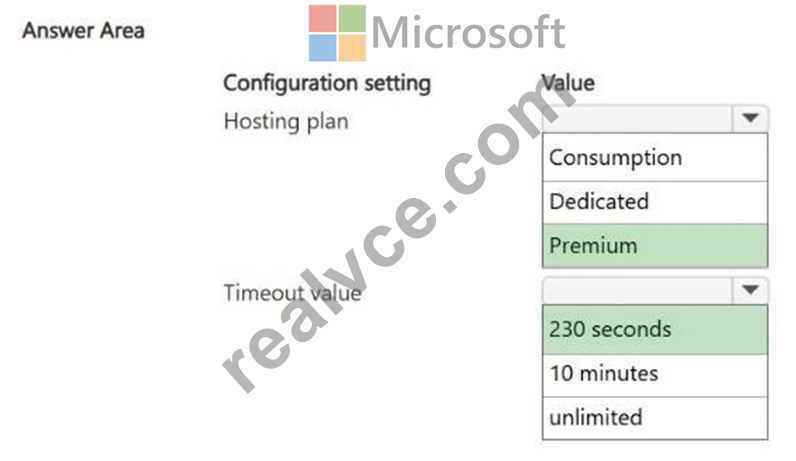
Explanation:
Box 1: Premium
To fulfill your requirements, you should use the Azure Functions Premium plan (also known as the Elastic Premium plan).
Event-Driven Scaling: It features dynamic, automatic scale-out driven by the Azure scale controller. It can scale down to zero instances when idle, ensuring you only pay for active compute time.
Custom Linux Images: Unlike the base Consumption plan, the Premium plan allows you to deploy and run your functions inside a custom Linux container image. This lets you bring your own custom OS dependencies, specialized tools, or specific runtime environments.
Box 2: 230 seconds
The correct maximum timeout value to use for an HTTP-triggered function is 230 seconds.
Azure Load Balancer Limit: Regardless of the specific Azure Functions hosting plan or timeout configurations you set in host.json, the Azure Functions Scale and Hosting documentation states that an HTTP-triggered function has a hard limit of 230 seconds to respond to a request.
Idle Timeout: This constraint is strictly enforced due to the default idle timeout of the underlying Azure Load Balancer. If your function runs longer than 230 seconds without returning a response, the connection will be dropped, resulting in a timeout error.
Reference:
https://learn.microsoft.com/en-us/azure/azure-functions/functions-deployment-technologies
https://learn.microsoft.com/en-us/azure/azure-functions/functions-scale
NEW QUESTION # 70
You need to translate real-time spoken customer conversations from English to Spanish text during a support call, with minimal latency. Which Azure AI service should you use?
- A. Azure AI Language (Text Analytics)
- B. Azure AI Translator (text translation REST API)
- C. Azure AI Document Intelligence
- D. Azure AI Speech (Speech Translation)
Answer: D
Explanation:
Azure AI Speech's Speech Translation capability performs real-time speech-to-text and translation in a single streaming pipeline, purpose-built for low-latency live audio scenarios, unlike the text-only Translator service.
NEW QUESTION # 71
Your application must classify uploaded product images into one of 40 custom categories specific to your business (e.g., proprietary part numbers). What should you use?
- A. Azure AI Face API
- B. Azure AI Custom Vision (image classification)
- C. Azure AI Vision prebuilt image analysis
- D. Azure AI Document Intelligence
Answer: B
Explanation:
Prebuilt Vision models recognize general objects/scenes but not business-specific categories.
Custom Vision allows you to train a classifier on your own labeled images for domain-specific categories such as proprietary part numbers.
NEW QUESTION # 72
......
Pass Azure AI Engineer Associate AI-200 Exam With 93 Questions: https://www.realvce.com/AI-200_free-dumps.html