


MCE-Dev-201 Free Certification Exam Material from RealVCE with 198 Questions
Use Real MCE-Dev-201 - 100% Cover Real Exam Questions
NEW QUESTION # 18
Which aspect should a developer consider before creating an Server-to-Server Installed Package and associated API Integration i* Marketing Cloud?
- A. Scope (Permissions) must be specifically granted when creating an API Integration component inside an Installed Package.
- B. Using an Installed Package, APIs will have access to resources in all Business Units.
- C. Scope (Permissions) will be granted based on the User who is creating the Installed Package.
Answer: A
Explanation:
When creating a Server-to-Server Installed Package and associated API Integration in Marketing Cloud, it is essential to grant specific scopes (permissions) to the API Integration component. This ensures that the integration has the necessary access to perform its tasks without granting unnecessary permissions.
Salesforce Installed Packages and API Integrations
NEW QUESTION # 19
What is the purpose of the IF statement below?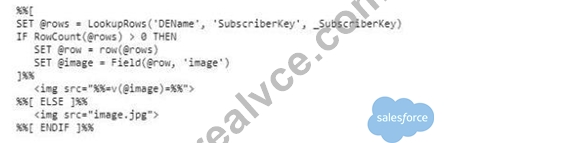
- A. To handle when there are multiple records in the data extension for the subscriber
- B. To handle when images are broken
- C. To handle when no row is returned by the LookupRows function
- D. To handle when the subscriber is in a held status
Answer: C
Explanation:
The purpose of the IF statement in the AMPscript code is to check if any rows are returned by the LookupRows function. If rows are returned, it retrieves the image field from the data extension and sets the image source accordingly. If no rows are returned, it defaults to using a standard image.
Salesforce AMPscript LookupRows Function
NEW QUESTION # 20
NTO puts the word TEST at the beginning of the namefor each test email. Which query would return the subs who were sent those emails?
- A. SELECT * FROM _Job INNER JOIN _Sent on JobID = JobID WHERE EmailName LIKE 'TEST%'
- B. SELECT * FROM_Job J INNER JOIN _Sent S ON.JobID = S.JobID WHERE J.EmailName LIKE
'TEST%' - C. SELECT * FROM _Job J INNER JOIN _Sent S on J.JobID = JobID = S.JobID WHERE J.EmailName
= 'TEST%' - D. SELECT * FROM _Job J INNER JOIN _Sent S on J.EmailName LIKE 'TEST%'
Answer: B
Explanation:
To retrieve subscribers who were sent emails with names starting with "TEST," we need to join the _Job and
_Sent system data views on the JobID field and filter by the EmailName field using a LIKE condition.
* Join Condition: The correct join condition between _Job and _Sent is ON J.JobID = S.JobID. This ensures that we are linking the job and sent data correctly.
* EmailName Filter: We use J.EmailName LIKE 'TEST%' to filter for emails whose names start with
"TEST".
SELECT * FROM _Job J INNER JOIN _Sent S ON J.JobID = S.JobID WHERE J.EmailName LIKE
'TEST%'
Salesforce Marketing Cloud System Data Views
NEW QUESTION # 21
Which SSJS library can be used in email messages? Choose 1.
- A. Core
- B. Platform
- C. Both
- D. None
Answer: B
NEW QUESTION # 22
How many month of data can a developer query from the tracking data views (_Sent, _Open, _Click)?
- A. 12 Months
- B. One Month
- C. There is no limit
- D. Six Months
Answer: D
Explanation:
The tracking data views in Salesforce Marketing Cloud, such as _Sent, _Open, and _Click, store data for a limited period.
* Data Retention Period: Salesforce Marketing Cloud retains tracking data for up to six months in the data views. This means that developers can query up to six months of tracking data using these views.
Salesforce Marketing Cloud Data Views
NEW QUESTION # 23
Which programming language should be used in email messages? Choose 1.
- A. Both
- B. AMPscript only
- C. Either AMPscript or SSJS
- D. SSJS only
Answer: C
Explanation:
In Salesforce Marketing Cloud, you can use either AMPscript or Server-Side JavaScript (SSJS) in email messages. Both languages are supported and can be used to manipulate data, create dynamic content, and perform other server-side operations.
Salesforce Programming Languages in Emails
NEW QUESTION # 24
A marketer is troubleshooting why an email send's tracking information is not available in Sales Cloud. The marketer confirms MarketingCloud Connect is installed properly. What should be confirmed next to continue troubleshooting the send's tracking information?
- A. The email was sent to the All Subscribers list
- B. The audience was a Salesforce Data Extension containing the appropriate SFID
- C. The tracking destination folder was set to My Tracking
- D. The audience was built using a Triggered Send Data Extension template
Answer: B
Explanation:
If the email send's tracking information is not available in Sales Cloud, the next step is to confirm that the audience was a Salesforce Data Extension containing the appropriate Salesforce ID (SFID).
* Salesforce Data Extension: Ensure that the data extension used for the send is a Salesforce Data Extension that includes the appropriate SFID for each subscriber. This is crucial for the integration to correctly match the tracking data with the Salesforce records.
Salesforce Marketing Cloud Connect Troubleshooting
NEW QUESTION # 25
A developer needs to configure an Email Send Logging Data Extension for a new business unit.
Which option should be used?
- A. Create and ensure it has the name "Send Log"
- B. Salesforce Support should create the data extension
- C. Create using the SendLog Data ExtensionTemplate
- D. Create from a copy of an existing Send Log in another business unit
Answer: C
NEW QUESTION # 26
Northern Trails Outfitters (NTO)has a sendable data extension with 1,500,000 contact records they want to delete.
Which step is required before deleting the contacts?
- A. Divide the records in half and delete each resulting data extension
- B. Navigate to Contact Builder and delete the dataextension
- C. Query the records into a new sendable data extension and delete it
- D. Navigate to Email Studio and delete the data extension
Answer: B
Explanation:
Before deleting a sendable data extension that contains a large number of contact records, it is important to manage the contact deletion through Contact Builder. Deleting the data extension from Contact Builder ensures that all related contact information is also removed from the contact model.
Salesforce Contact Builder
NEW QUESTION # 27
A developer wants to create a CloudPage which is linked from an email. %%[SET @point = RequestParameter(x) SET @value = 5 IF Length(@point) > 1 THEN SET @value = 1 ELSEIF Length (@point)>2 THEN SET @value = 2 ELSEIF Length(@point) >3 THEN SET@value = 3 ELSEIF Length (@point) >4 THEN SET @value = 4 ENDIF]%% Which is the expected value of @value if x = 'Tacos'?
- A. 0
- B. 1
- C. 2
- D. 3
Answer: C
Explanation:
In the provided AMPscript, the IF statement checks the length of the @point variable and sets @value accordingly. Since x = 'Tacos' has a length of 5, it meets the first condition Length(@point) > 1, which sets
@value to 1. Subsequent conditions are not evaluated because the first condition is already true.
* AMPscript IF-ELSEIF Example:
%%[ SET @point = RequestParameter('x') SET @value = 5 IF Length(@point) > 1 THEN SET @value = 1 ELSEIF Length(@point) > 2 THEN SET @value = 2 ELSEIF Length(@point) > 3 THEN SET @value = 3 ELSEIF Length(@point) > 4 THEN SET @value = 4 ENDIF ]%% Salesforce AMPscript Documentation
NEW QUESTION # 28
A developer wants to write a query to compile data originating from an HTML form so it can be exported in CSV format. However, the source data extension may containline breaks within the Comments field, which makes it difficult to read and sort the resulting CSV.
Which SQL functions could be used to change each line break to a single space?
- A. REPLICATE and NCHAR
- B. FORMAT and SPACE
- C. REPLACE and CHAR
- D. LTRIM and RTRJM
Answer: C
Explanation:
To remove line breaks within the Comments field and replace them with a single space, you can use the REPLACE function in combination with the CHAR function. The CHAR(13) and CHAR(10) functions represent carriage return and line feed characters, respectively.
* REPLACE Function: This function is used to replace occurrences of a specified string with another string.
* CHAR Function: This function returns the character based on the ASCII code provided.
* Example:
SELECT REPLACE(REPLACE(Comments, CHAR(13), ' '), CHAR(10), ' ') AS Comments FROM YourDataExtension Salesforce SQL Reference
NEW QUESTION # 29
An UpdateDE AMPscript function is used to update a column value in a data extension row when an email is sent. The emailis being sent to 250,000 subscribers, but the user decides to cancel the send during the sending process and only 400 emails are sent.
How many subscriber rows would be affected by the UpdateDE function?
- A. All 250,000 subscribers
- B. 400 subscribers who were sent the email
- C. No rows are updated
- D. Only subscribers who exist in All Subscribers
Answer: B
Explanation:
The UpdateDE function in AMPscript updates the data extension rows as the emails are being sent. If the send is canceled and only 400 emails are sent, then only the 400 subscribers who received the email will have their data extension rows updated by the UpdateDE function.
Salesforce AMPscript UpdateDE Function
NEW QUESTION # 30
A company need to retrieve a large number of rows from a DE via the API. Which two solutions would optimize the performance? Choose2
- A. Use the ContinueRequest feature
- B. Use the REST API instead of the SOAP API
- C. Use AMPscript API functions on a CloudPage
- D. Use a SimpleFilterPart to retrieve small sets of relevant data.
Answer: A,D
Explanation:
To optimize the performance when retrieving a large number of rows from a Data Extension via the API:
* Use a SimpleFilterPart to retrieve small sets of relevant data (A) - This approach helps in fetching only the necessary data by applying filters, thus reducing the amount of data transferred and processed.
* Use the ContinueRequest feature (C) - This feature in the SOAP API allows for pagination of results, making it possible to handle large sets of data in manageable chunks.
References:
Salesforce Marketing Cloud API
Salesforce Marketing Cloud ContinueRequest
NEW QUESTION # 31
A developer wants to trigger an SMS message to a subscriber using a form published on CloudPages. How should the SMS message be triggered once the subscriber submits the form?
- A. Outbound SMS template and Automation Send Method
- B. requestToken and messageContact REST API objects
- C. CreateSMSConservation AMPscript function
- D. InsertData AMPscript function to add the subscriber to a MobileConnect list
Answer: B
Explanation:
To trigger an SMS message to a subscriber using a form published on CloudPages, the developer should use the requestToken and messageContact REST API objects (D). These objects can be used to authenticate and send the SMS message programmatically when the form is submitted.
References:
Salesforce Marketing Cloud MobileConnect API
Salesforce Marketing Cloud REST API
NEW QUESTION # 32
A developer needs to add From Addresses to Marketing Cloud and wants to ensure they are verified before being used for sending.
Which tworoutes would allow this?
Choose 2 answers
- A. POST /messaging/vl/dataevents/domainverification
- B. POST /messaging/vl/domainverification
- C. POST /messaging/vl/domainverification/bulk/insert
- D. POST/messaging/vl/push/domain/verification
Answer: B,C
Explanation:
To add and verify From Addresses in Marketing Cloud, you can use the following routes:
* POST /messaging/v1/domainverification: This endpoint is used to verify a single domain.
* POST /messaging/v1/domainverification/bulk/insert: This endpoint is used to verify multiple domains in bulk.
Salesforce Domain Verification API
NEW QUESTION # 33
A developer needs to configure an Email Send Logging Data Extension for a new business unit. Which option should be used?
- A. Create and ensure it has the name "Send Log"
- B. Salesforce Support should create the data extension
- C. Create using the SendLog Data ExtensionTemplate
- D. Create from a copy of an existing Send Log in another business unit
Answer: C
Explanation:
To configure an Email Send Logging Data Extension for a new business unit, the recommended approach is to use the SendLog Data Extension Template. This ensures that all necessary fields and configurations are correctly set up to log email send data.
* SendLog Data Extension Template: This template includes predefined fields and settings that are required for logging email sends. Using this template ensures that the data extension is set up correctly for tracking send logs.
* Go to Email Studio -> Subscribers -> Data Extensions.
* Click on "Create".
* Choose "Create from Template" and select the "SendLog" template.
* Follow the prompts to configure and save the new Send Log data extension.
Salesforce Email Send Logging
NEW QUESTION # 34
A developer created an email using the fasubjectLine variable as the subject line. Due to revisions, the developer declared <>subjectLine in multiple locations throughout the email, including:
Which subject line will be used at the time of deployment?
- A. Enjoy 15% off today
- B. Enjoy 10% off today
- C. Enjoy 20% off today
Answer: C
Explanation:
When the subjectLine variable is declared in multiple locations throughout the email, the value used at the time of deployment will be the last value assigned to the variable. In the provided declarations, the last assignment is:
%%[ SET @subjectLine = 'Enjoy 20% off today' ]%% was declared within the Subject Line Therefore, the subject line used at the time of deployment will be "Enjoy 20% off today" (C).
References:
Salesforce Marketing Cloud AMPscript Variable Scope
AMPscript Guide: Variable Declaration
NEW QUESTION # 35
A developer want to email a subscriber who is currently being processed for a Contact Deletion request.
When could the Contact be reintroduced after a Contact Delete operation has started?
- A. 14 days after deletion process is complete
- B. After deletion is fully complete
- C. Anytime
- D. Never
Answer: B
Explanation:
A Contact can be reintroduced into the system only after the deletion is fully complete. The Contact Delete process in Salesforce Marketing Cloud is designed to ensure that all references and data associated with the contact are thoroughly removed. Reintroducing the contact before the process is fully complete would disrupt this cleanup process and potentially lead to data integrity issues.
References:
Salesforce Marketing Cloud Documentation on Contact Deletion
Salesforce Marketing Cloud Contact Builder
NEW QUESTION # 36
Northtrn Trail Outfitters has set up their North American business unit to unsubscribe at the business unit level.
Which dataview would they query to identify all subscribers who are unsubscribed from that Business Unit?
- A. _BusinessUnitUnsubscribes
- B. ENT._Subscribers
- C. ListSubscribers
- D. .Subscribers
Answer: C
Explanation:
To identify all subscribers who are unsubscribed from a specific Business Unit, the correct Data View to query is ListSubscribers (A). This Data View contains information about the subscription status of subscribers at the list level, including unsubscribe status for specific Business Units.
References:
Salesforce Marketing Cloud Data Views
ListSubscribers Data View
NEW QUESTION # 37
......
Dumps Brief Outline Of The MCE-Dev-201 Exam: https://www.realvce.com/MCE-Dev-201_free-dumps.html
MCE-Dev-201 Training & Certification Get Latest Salesforce Developers: https://drive.google.com/open?id=1PefDQzGWKrQnhairRRF6B5boNPsl2War