


AZ-140 Exam Preparation Material with New AZ-140 Dumps Questions
AZ-140 2026 Training With 289 QA's
Microsoft AZ-140 exam, also known as Configuring and Operating Microsoft Azure Virtual Desktop, is designed for professionals who are responsible for configuring, managing, and deploying virtual desktop infrastructure (VDI) solutions using Azure Virtual Desktop. AZ-140 exam validates the candidate's expertise in designing, implementing, and managing virtual desktops and applications on Azure, including monitoring and optimizing performance, ensuring security and compliance, and managing user access and data.
NEW QUESTION # 108
You have a Azure Virtual Desktop host pool that runs Windows 10 Enterprise multi-session.
You need to configure automatic scaling of the host pool to meet the following requirements:
- Distribute new user sessions across all running session hosts.
- Automatically start a new session host when concurrent user sessions
exceed 30 users per host.
What should you include in the solution?
- A. an Azure load balancer and the depth-first load balancing algorithm
- B. an Azure Automation account and the depth-first load balancing algorithm
- C. an Azure load balancer and the breadth-first load balancing algorithm
- D. an Azure Automation account and the breadth-first load balancing algorithm
Answer: D
Explanation:
Distribute new user sessions across all running session hosts.
https://docs.microsoft.com/en-us/azure/virtual-desktop/configure-host-pool-load- balancing#configure-breadth-first-load-balancing https://docs.microsoft.com/en-us/azure/virtual- desktop/set-up-scaling-script#how-the-scaling-tool-works
NEW QUESTION # 109
You have an Azure Virtual Desktop deployment that contains a host pool named Pool1. Pool1 contains the session hosts shown in the following table.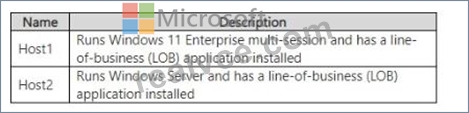
You have two internal users named User1 arndUser2.
You plan to enable the following connectivity for the Azure Virtual Desktop deployment:
* User1 will connect to Host1.
* User2 will connect to Host2.
Which license should you recommend for each user? To answer, drag the appropriate licenses to the correct users. Each license may be used once, more than once, or not at all. You may need to drag the split bar between panes or scroll to view content.
NOTE: Each correct selection is worth one point.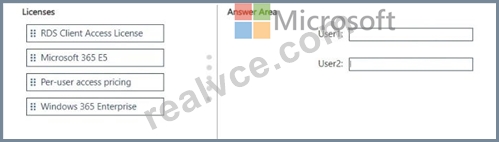
Answer:
Explanation: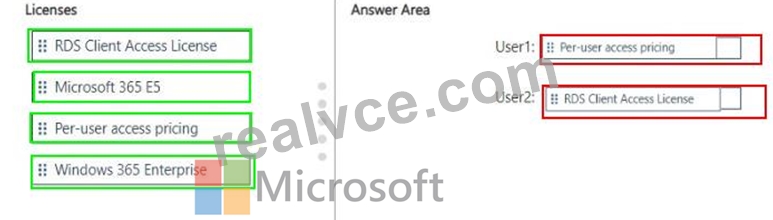
NEW QUESTION # 110
You need to recommend a DNS infrastructure that meet the performance requirements. What should you recommend? To answer, select the appropriate options in the answer are a. NOTE: Each correct selection is worth one point.
Answer:
Explanation:
NEW QUESTION # 111
You have an Azure storage account that contains the generalized Windows 10 disk images shown in the following table.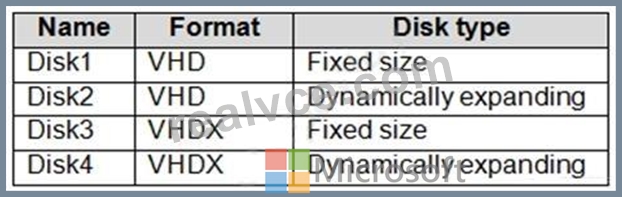
You need to create an image that will be used to deploy an Azure Virtual Desktop session host.
Which disk should you use?
- A. Disk1
- B. Disk4
- C. Disk2
- D. Disk3
Answer: A
Explanation:
Reference:
https://docs.microsoft.com/en-us/azure/virtual-desktop/set-up-customize-master-image
NEW QUESTION # 112
You have a Windows Virtual Desktop deployment.
You plan to create the host pools shown in the following table.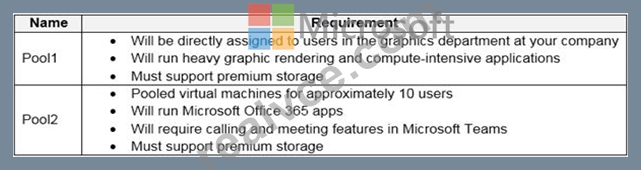
You need to recommend the virtual machine size for each host pool. The solution must minimize costs.
Which size should you recommend for each pool? To answer, select the appropriate options in the answer area.
NOTE: Each correct selection is worth one point.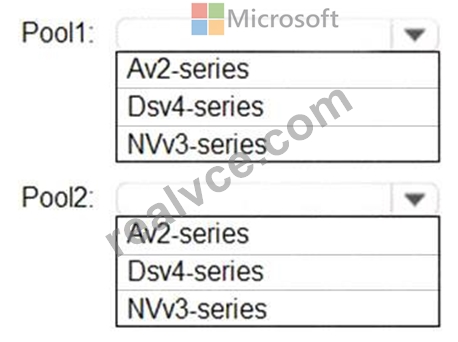
Answer:
Explanation: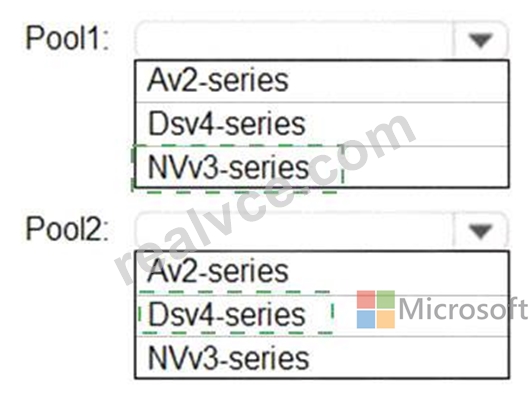
Explanation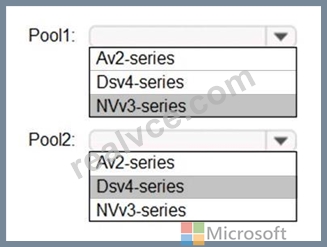
Reference:
https://docs.microsoft.com/en-us/azure/virtual-machines/sizes
https://docs.microsoft.com/en-us/azure/virtual-machines/nvv3-series
https://docs.microsoft.com/en-us/azure/virtual-machines/dv4-dsv4-series
NEW QUESTION # 113
Hotspot Question
You have an Azure Virtual Desktop deployment that contains a host pool named HostPool1.
You need to perform the following configurations for HostPool1:
- Set the scale factor of the remote session to 125 percent.
- Generate a registration key that expires after five days.
- Enable Start VM on connect.
Which three settings should you modify? To answer, select the appropriate settings in the answer area.
NOTE: Each correct selection is worth one point.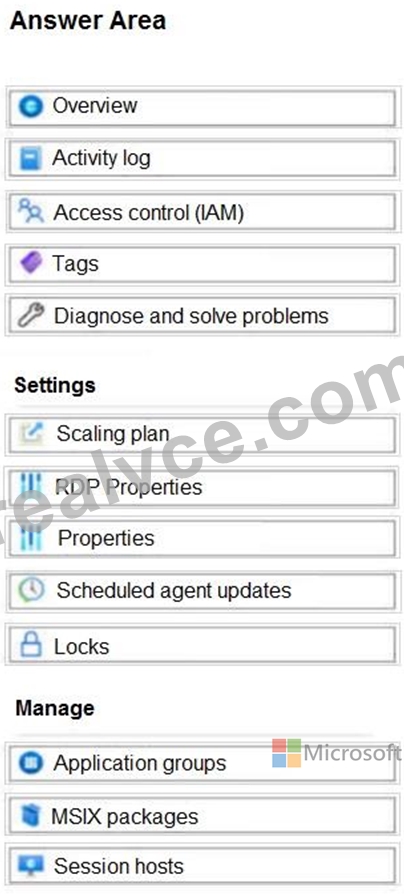
Answer:
Explanation: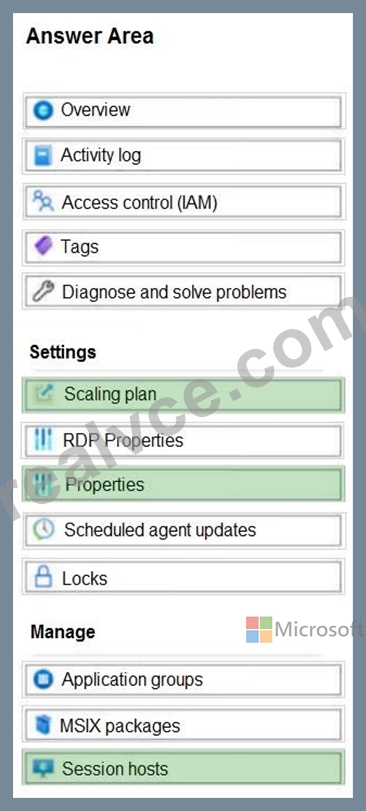
Explanation:
* Set the scale factor of the remote session to 125 percent. => RDP properties It's about Desktop scale factor.
* Generate a registration key that expires after five days. => Session hosts If you want to add a host, you need a valid registration key.
* Enable Start VM on connect. => Properties
NEW QUESTION # 114
You have an Azure Virtual Desktop host pool in the US East Azure region.
You need to ensure that the host pool can fail over to the US West Azure region.
What should you do first?
- A. Create a virtual machine snapshot of each session host.
- B. Create an Azure Storage account that uses geo-redundant storage (GRS).
- C. Create a Recovery Services vault.
- D. Create a new host pool.
Answer: C
Explanation:
Reference:
https://docs.microsoft.com/en-us/azure/site-recovery/azure-to-azure-tutorial-enable-replication
NEW QUESTION # 115
Your company has a single office and has 40 employees.
You are planning an Azure Virtual Desktop deployment. The estimated user workloads are shown in the following table.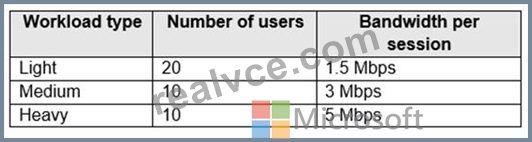
Half the users of each workload type work from home. All the users who work from home do NOT establish a VPN connection to the office.
Approximately how much bandwidth is needed between the office and Azure to support the planned workloads?
- A. 55 Mbps
- B. 220 Mbps
- C. 9.5 Mbps
- D. 110 Mbps
Answer: A
Explanation:
10 * 1,5 = 15
5 x 3 = 15
5 x 5 = 25
Total: 15 + 15 + 25 = 55 mbps
Half of each group is working from home.
NEW QUESTION # 116
You need to prepare the disk on VM1 for use with the Azure Virtual Desktop deployment. Which two actions should you perform? Each correct answer presents part of the solution. NOTE: Each correct selection is worth one point.
- A. Compact the disk.
- B. Convert the disk type to Fixed size.
- C. Merge the disk.
- D. Convert the disk format to VHD.
- E. Convert the disk type to Differencing.
Answer: B,D
NEW QUESTION # 117
You have an Azure subscription that contains an Azure Virtual Desktop deployment and the storage accounts shown in the following table.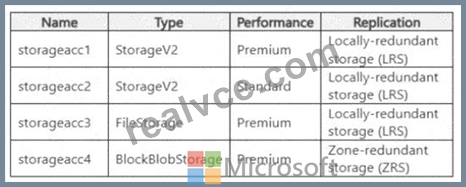
You need to configure storage for the FSLogix profile containers of the Azure Virtual Desktop deployment The solution must meet the following requirements:
* Provide redundancy in the event of a single server outage.
* Support FSLogix Profile containers.
* Minimize costs.
Which storage account should you use for the FSLogix profile containers?
- A. storageacc3
- B. storageac1
- C. storageacc2
- D. storageacc4
Answer: C
NEW QUESTION # 118
You have an Azure subscription that contains the resources shown in the following table.
You need to ensure that users can restore files saved to their FSLogix profile.
What should you do?
- A. From the Volume1 blade in the Azure portal, create a snapshot policy.
- B. From the CPool1 blade in the Azure portal, create a new volume.
- C. From the Azure portal, create a Recovery Services vault and a backup policy.
- D. From the Azure portal, create an Azure Backup vault and a backup policy.
Answer: A
Explanation:
It says they are using netapp for fslogix, so you should use snapshot policies.
https://learn.microsoft.com/en-us/azure/azure-netapp-files/backup-configure-policy-based
NEW QUESTION # 119
Drag and Drop Question
Your on-premises network contains an Active Directory domain that syncs with an Azure AD tenant.
You have an Azure Virtual Desktop host pool that contains Windows 11 session hosts joined to the domain.
You need to configure Azure NetApp Files to store user profile containers.
Which four actions should you perform in sequence? To answer, move the appropriate actions from the list of actions to the answer area and arrange them in the correct order.
NOTE: More than one order of answer choices is correct. You will receive credit for any of the correct orders you select.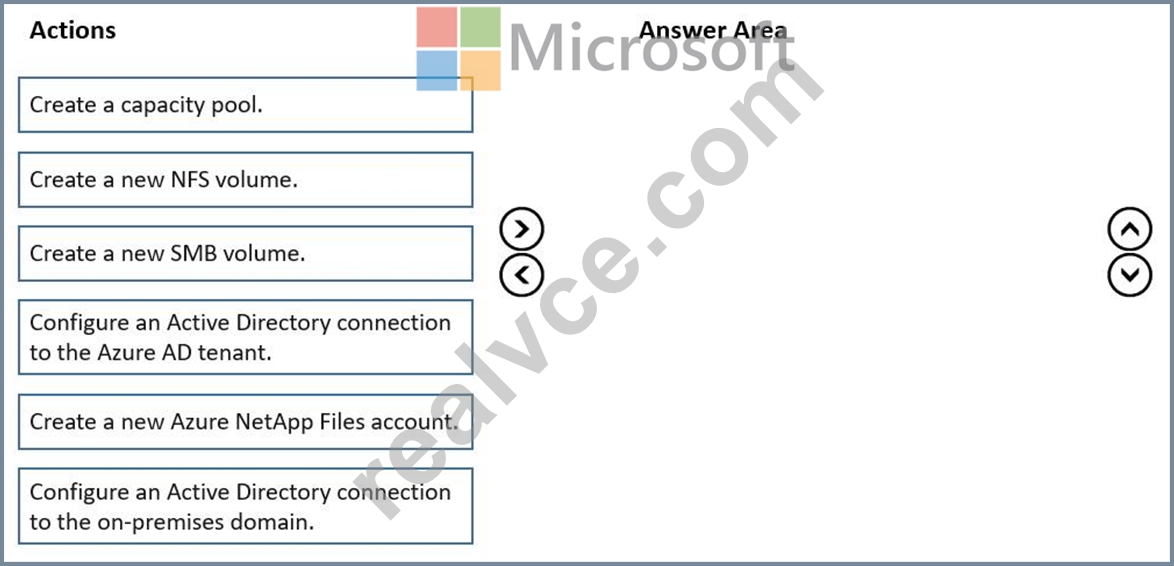
Answer:
Explanation: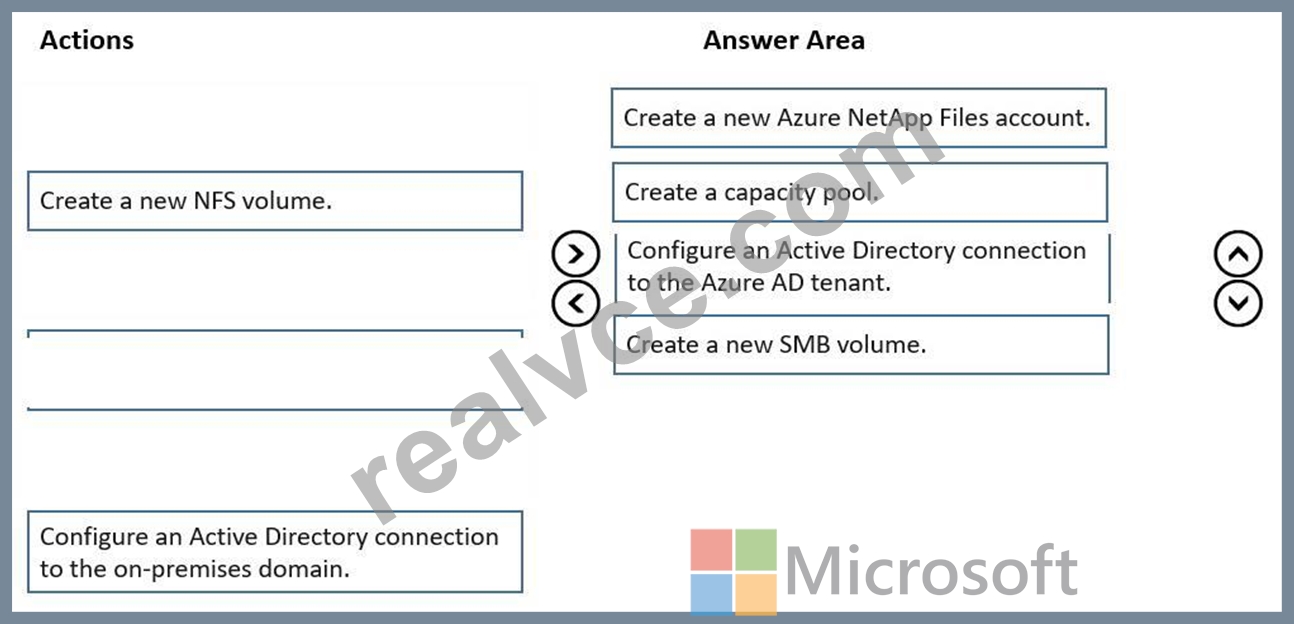
NEW QUESTION # 120
You have an Azure Virtual Desktop deployment that contains the resources shown in the following table.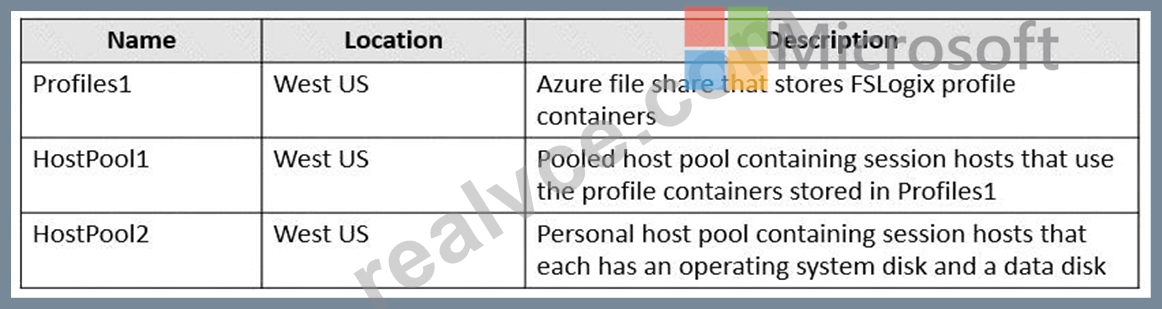
You create the resources shown in the following table.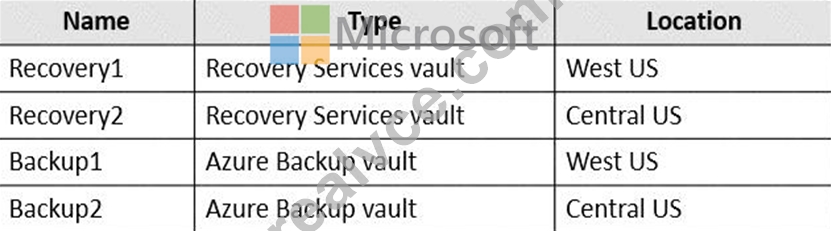
You need to meet following requirements:
* Back up the FSLogix profile containers used by HostPool1.
* Backup the data disks in HostPool2.
To which resources can you back up the profile containers and the data disks? To answer, select the appropriate options in the answer area.
NOTE: Each correct selection is worth one point.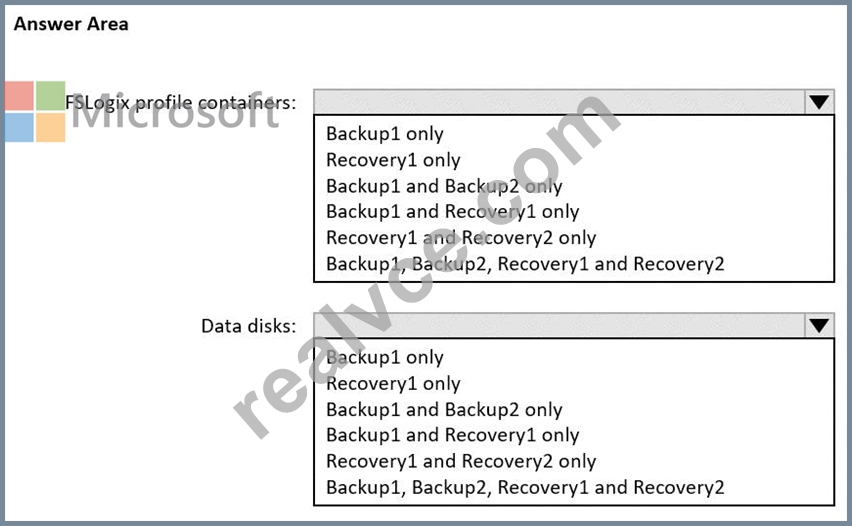
Answer:
Explanation: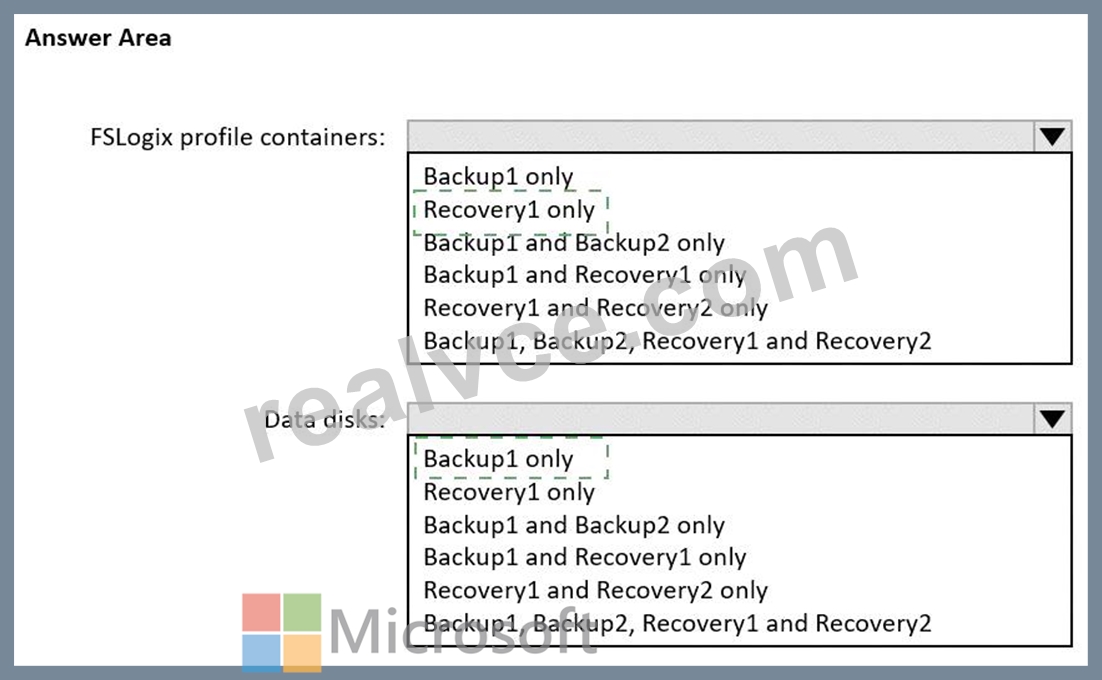
Explanation:
Graphical user interface, text, application, email Description automatically generated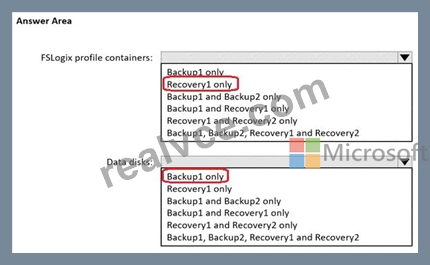
NEW QUESTION # 121
You decide to add a new image to the Shared Image Gallery definition. This image is utilized for a large-scale Azure Virtual Desktop deployment with 60 Session Hosts. While deploying, you notice that the new session host process is somewhat slow and it gets time out.
Which of the following steps would you take to resolve this issue?
- A. Replicate the image to 10 different regions
- B. Increase the replica count to 3 in the deployment region
- C. Increase the replica count to 6 in the deployment region
- D. Replicate the image to 5 different regions
- E. Double the replica count in the deployment region
Answer: B
NEW QUESTION # 122
You have an Azure subscription.
You plan to deploy an Azure Virtual Desktop solution that will contain Windows 10 multi-session hosts in a single host pool. The solution has the requirements shown in the following table.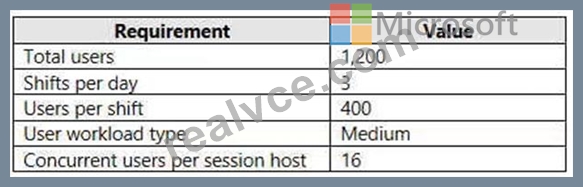
You need to configure the session host for the host pool. The solution must minimize costs.
How many session hosts should the host pool contain, and how many vCPUs should each session host have?
To answer, select the appropriate options in the answer area.
NOTE: Each correct selection is worth one point.
Hot Area: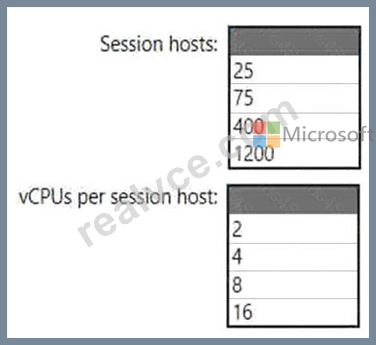
Answer:
Explanation: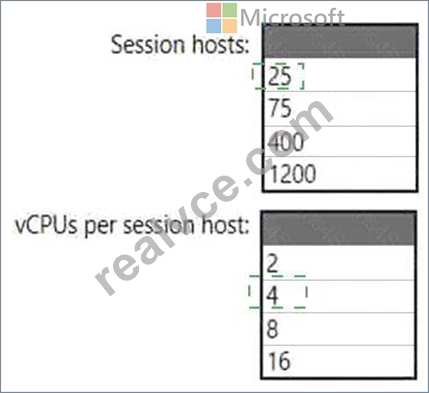
Explanation
Graphical user interface, application, table Description automatically generated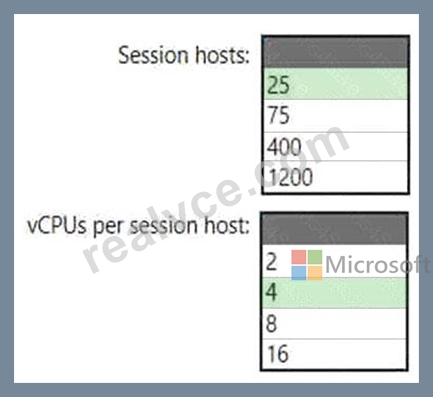
NEW QUESTION # 123
You have an Azure subscription that contains a hybrid Azure Active Directory (Azure AD) tenant and two domain-joined Azure virtual machines. The virtual machines run Windows Server 2019 and contain managed disks.
You plan to deploy an Azure Virtual Desktop host pool that will use a Storage Spaces Direct Scale-Out File Server to host user profiles.
You need to ensure that the virtual machines can host the Storage Spaces Direct deployment. The solution must meet the following requirements:
* Ensure that the user profiles are available if a single server falls.
* Minimize administrative effort.
What should you do? To answer, select the appropriate options In the answer area. NOTE: Each correct selection is worth one point.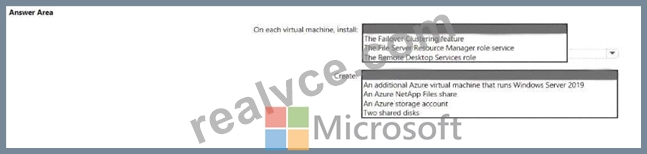
Answer:
Explanation: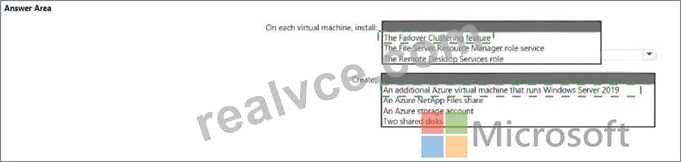
Explanation
NEW QUESTION # 124
You have an Azure subscription that contains the virtual machines shown in the following table.
You create a shared image gallery as shown in the SharedGallery1 exhibit. (Click the SharedGallery1 tab.)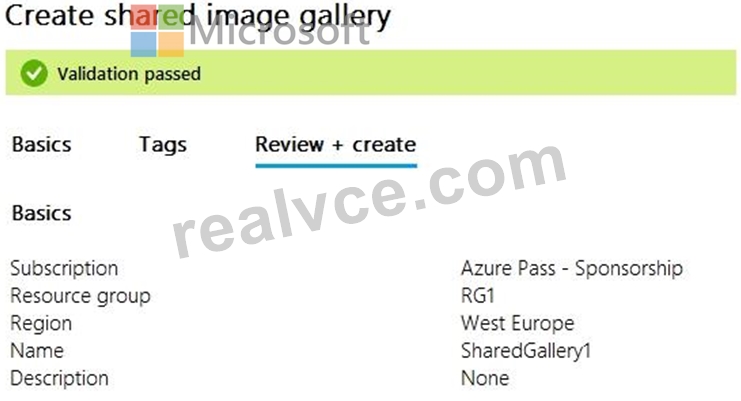
You create an image definition as shown in the Image1 exhibit. (Click the Image1 tab.)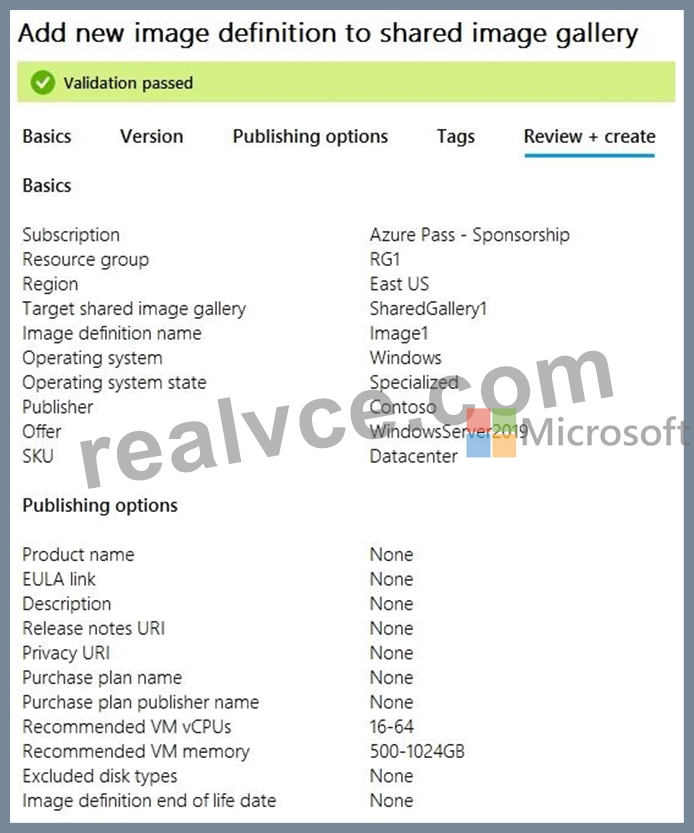
For each of the following statements, select Yes if the statement is true. Otherwise, select No.
NOTE: Each correct selection is worth one point.
Answer:
Explanation: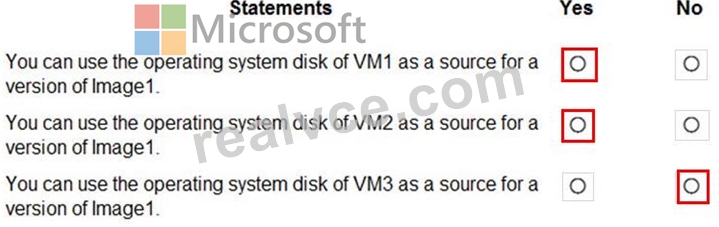
Reference:
https://www.robinhobo.com/windows-virtual-desktop-wvd-image-management-how-to-manage-and-deploy-custom-images-including-versioning-with-the-azure-shared-image-gallery-sig/
NEW QUESTION # 125
You have a Windows Virtual Desktop host pool that contains two session hosts. The Microsoft Teams client is installed on each session host.
You discover that only the Microsoft Teams chat and collaboration features work. The calling and meeting features are disabled.
You need to ensure that users can set the calling and meeting features from within Microsoft Teams.
What should you do?
- A. Configure audio input redirection.
- B. Install the Remote Desktop WebRTC Redirector Service.
- C. Configure Remote audio mode in the RDP Properties.
- D. Install the Teams Meeting add-in for Outlook.
Answer: B
Explanation:
Explanation/Reference:
https://docs.microsoft.com/en-us/azure/virtual-desktop/teams-on-wvd
NEW QUESTION # 126
Hotspot Question
You have an Azure Virtual Desktop deployment.
Many users have iOS devices that have the Remote Desktop Mobile app installed.
You need to ensure that the users can connect to the feed URL by using email discovery instead of entering the feed URL manually.
How should you configure the _msradc DNS record? To answer, select the appropriate options in the answer area.
NOTE: Each correct selection is worth one point.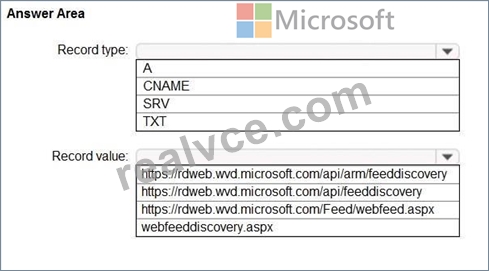
Answer:
Explanation: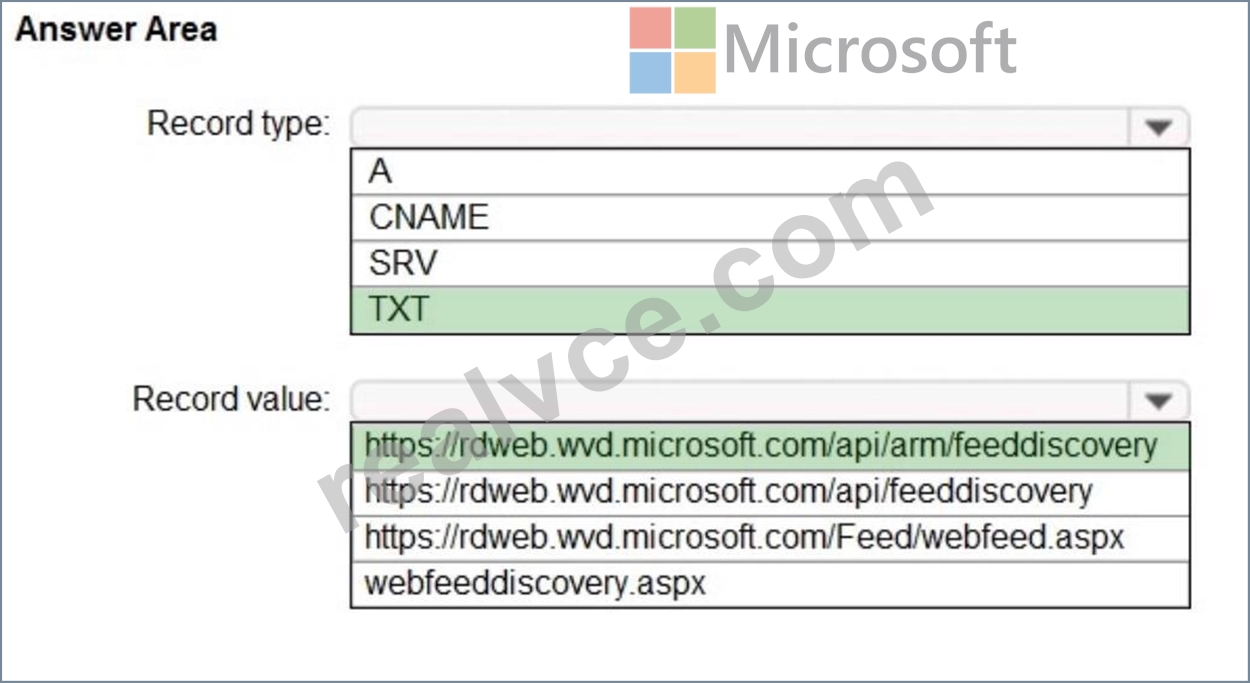
Explanation:
- Make sure you have permission to add a TXT record to the domain associated with your email (for example, if your users have @contoso.com email addresses, you would need permissions for the contoso.com domain)
- Create an RD Web feed URL (https://<rdweb-dns-name>.domain/RDWeb/Feed/webfeed.aspx, such as https://rdweb.contoso.com/RDWeb/Feed/webfeed.aspx) Note:
If you're using Azure Virtual Desktop instead of Remote Desktop, you'll want to use these URLs instead:
- If you're using Azure Virtual Desktop (classic):
https://rdweb.wvd.microsoft.com/api/feeddiscovery/webfeeddiscovery.aspx
- If you're using Azure Virtual Desktop: https://rdweb.wvd.microsoft.com/api/arm/feeddiscovery
https://docs.microsoft.com/en-us/windows-server/remote/remote-desktop-services/rds-email- discovery
NEW QUESTION # 127
You have an Azure Virtual Desktop host pool named Pool1 and an Azure Storage account named storage1.
Pool1 and storage1 are in the same Azure region.
The current network utilization of the session hosts during peak hours is 95%.
You plan to use FSLogix profile containers stored in storage1 for users that connect to Pool1.
You need to configure the session hosts and storage1 to minimize network latency when loading and updating profiles.
What should you do? To answer, select the appropriate options in the answer area.
NOTE: Each correct selection is worth one point.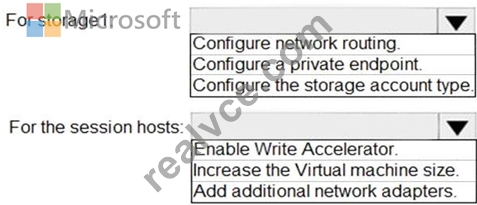
Answer:
Explanation: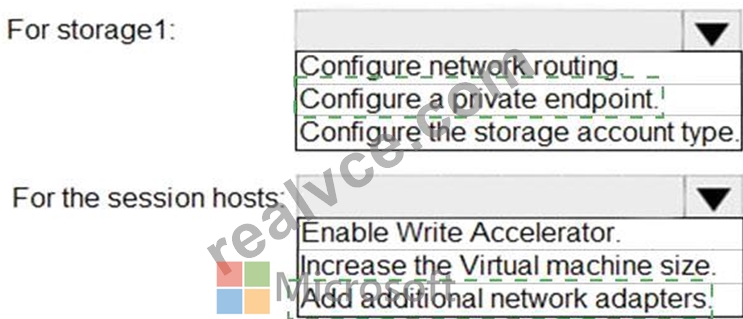
Explanation
Graphical user interface, text, application, chat or text message Description automatically generated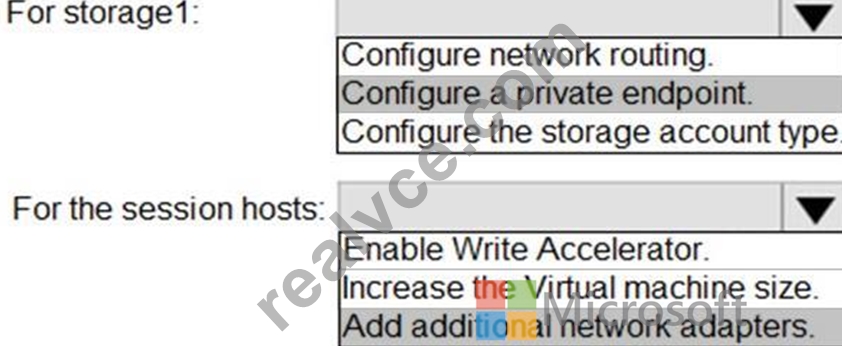
Reference:
https://docs.microsoft.com/en-us/azure/architecture/example-scenario/wvd/windows-virtual-desktop-fslogix
NEW QUESTION # 128
You have a Azure Virtual Desktop host pool named Pool1 that contains three session hosts. The session hosts are configured to use FSLogtx profile containers. You need to configure Cloud Cache on the session hosts.
What should you do?
- A. Add VHDlocations entries to the Windows registry.
- B. Remove VHDlocations entries from the Windows registry.
- C. Configure FSLogtx Office Container.
- D. Uninstall the FSLogix agent
Answer: B
Explanation:
Reference:
https://docs.microsoft.com/en-us/fslogix/configure-cloud-cache-tutorial
NEW QUESTION # 129
......
To pass the AZ-140 exam, candidates must demonstrate their ability to implement, manage, and monitor Azure Virtual Desktop environments, including virtual machines, applications, and user profiles. They must also be able to troubleshoot common issues and optimize performance for end-users. AZ-140 exam is a great way to demonstrate your skills and knowledge in Azure Virtual Desktop and enhance your career opportunities in the field.
Quickly and Easily Pass Microsoft Exam with AZ-140 real Dumps: https://www.realvce.com/AZ-140_free-dumps.html
Microsoft AZ-140 Certification Exam Questions: https://drive.google.com/open?id=1Bnx98Lu43x07GSZ1ALehDsLR10wtumRV